
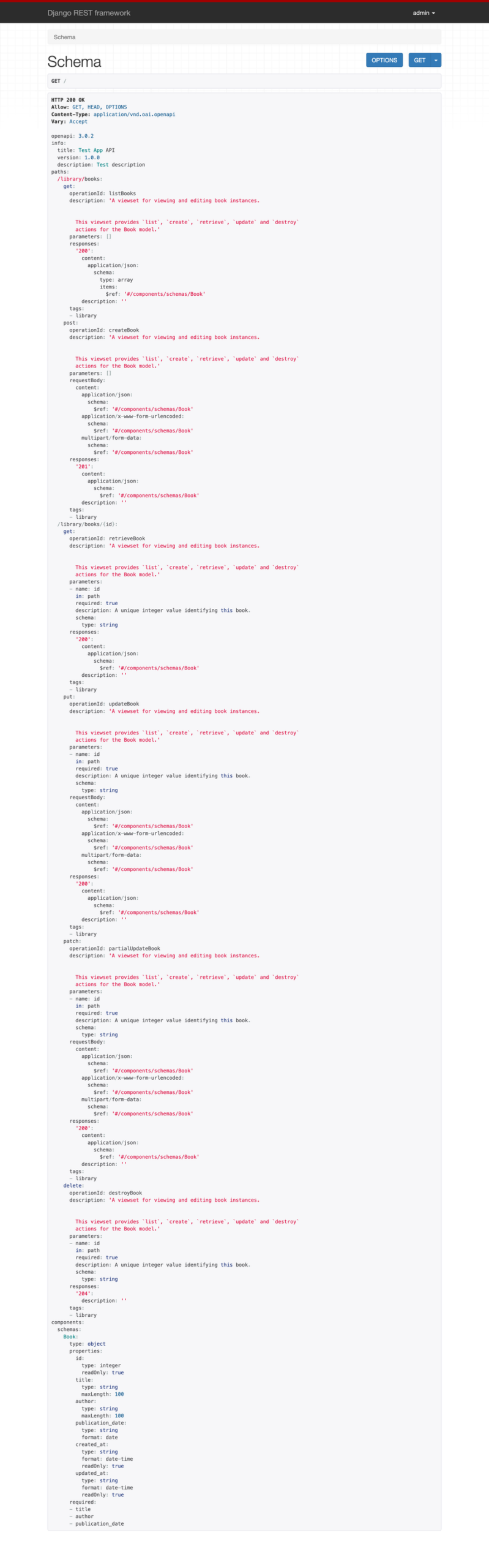
Ora configuriamo lo schema OpenAPI per integrare le applicazioni.
Per prima cosa, installare i pacchetti necessari:
# pip install drf-spectacular

Collecting drf-spectacular
  Using cached drf_spectacular-0.28.0-py3-none-any.whl.metadata (14 kB)
Requirement already satisfied: Django>=2.2 in ./venv/lib/python3.12/site-packages (from drf-spectacular) (5.1.7)
Requirement already satisfied: djangorestframework>=3.10.3 in ./venv/lib/python3.12/site-packages (from drf-spectacular) (3.15.2)
Collecting uritemplate>=2.0.0 (from drf-spectacular)
  Using cached uritemplate-4.1.1-py2.py3-none-any.whl.metadata (2.9 kB)
Collecting PyYAML>=5.1 (from drf-spectacular)
  Using cached PyYAML-6.0.2-cp312-cp312-macosx_11_0_arm64.whl.metadata (2.1 kB)
Collecting jsonschema>=2.6.0 (from drf-spectacular)
  Using cached jsonschema-4.23.0-py3-none-any.whl.metadata (7.9 kB)
Collecting inflection>=0.3.1 (from drf-spectacular)
  Using cached inflection-0.5.1-py2.py3-none-any.whl.metadata (1.7 kB)
Requirement already satisfied: asgiref<4,>=3.8.1 in ./venv/lib/python3.12/site-packages (from Django>=2.2->drf-spectacular) (3.8.1)
Requirement already satisfied: sqlparse>=0.3.1 in ./venv/lib/python3.12/site-packages (from Django>=2.2->drf-spectacular) (0.5.3)
Collecting attrs>=22.2.0 (from jsonschema>=2.6.0->drf-spectacular)
  Using cached attrs-25.3.0-py3-none-any.whl.metadata (10 kB)
Collecting jsonschema-specifications>=2023.03.6 (from jsonschema>=2.6.0->drf-spectacular)
  Using cached jsonschema_specifications-2024.10.1-py3-none-any.whl.metadata (3.0 kB)
Collecting referencing>=0.28.4 (from jsonschema>=2.6.0->drf-spectacular)
  Using cached referencing-0.36.2-py3-none-any.whl.metadata (2.8 kB)
Collecting rpds-py>=0.7.1 (from jsonschema>=2.6.0->drf-spectacular)
  Using cached rpds_py-0.23.1-cp312-cp312-macosx_11_0_arm64.whl.metadata (4.1 kB)
Collecting typing-extensions>=4.4.0 (from referencing>=0.28.4->jsonschema>=2.6.0->drf-spectacular)
  Using cached typing_extensions-4.12.2-py3-none-any.whl.metadata (3.0 kB)
Using cached drf_spectacular-0.28.0-py3-none-any.whl (103 kB)
Using cached inflection-0.5.1-py2.py3-none-any.whl (9.5 kB)
Using cached jsonschema-4.23.0-py3-none-any.whl (88 kB)
Using cached PyYAML-6.0.2-cp312-cp312-macosx_11_0_arm64.whl (173 kB)
Using cached uritemplate-4.1.1-py2.py3-none-any.whl (10 kB)
Using cached attrs-25.3.0-py3-none-any.whl (63 kB)
Using cached jsonschema_specifications-2024.10.1-py3-none-any.whl (18 kB)
Using cached referencing-0.36.2-py3-none-any.whl (26 kB)
Using cached rpds_py-0.23.1-cp312-cp312-macosx_11_0_arm64.whl (349 kB)
Using cached typing_extensions-4.12.2-py3-none-any.whl (37 kB)
Installing collected packages: uritemplate, typing-extensions, rpds-py, PyYAML, inflection, attrs, referencing, jsonschema-specifications, jsonschema, drf-spectacular
Successfully installed PyYAML-6.0.2 attrs-25.3.0 drf-spectacular-0.28.0 inflection-0.5.1 jsonschema-4.23.0 jsonschema-specifications-2024.10.1 referencing-0.36.2 rpds-py-0.23.1 typing-extensions-4.12.2 uritemplate-4.1.1
Poi, aggiornare urls.py nella directory principale dell’app (library_rest):
from django.contrib import admin
from django.urls import include, path
from rest_framework import permissions
from rest_framework.schemas import get_schema_view

from .permissions import AccessListPermission
from drf_spectacular.views import SpectacularAPIView, SpectacularRedocView, SpectacularSwaggerView

schema_url_patterns = [
    path('library/', include('library.urls')),
]

urlpatterns = [
    path('admin/', admin.site.urls),
    path('api-auth/', include('rest_framework.urls')),
    path('openapi', SpectacularAPIView().as_view(), name='schema'),
    path('',
         SpectacularRedocView.as_view(url_name='schema'), name='redoc'),
] + schema_url_patterns
Aggiungere in fondo al file settings.py:
REST_FRAMEWORK = {
    # YOUR SETTINGS
    'DEFAULT_SCHEMA_CLASS': 'drf_spectacular.openapi.AutoSchema',
    'DEFAULT_RENDERER_CLASSES': [
        'rest_framework.renderers.BrowsableAPIRenderer',
        'rest_framework.renderers.JSONRenderer',
    ],
}

SPECTACULAR_SETTINGS = {
    'TITLE': 'Library App API',
    'DESCRIPTION': 'Library description',
    'VERSION': '1.0.0',
    'SERVE_INCLUDE_SCHEMA': False,
    'COMPONENT_SPLIT_PATCH': False,
    'SERVE_URLCONF': 'library_rest.urls',
    'PUBLIC': False,
    'OAS_VERSION': '3.1.1'
}
Aggiungere drf_spectacular a INSTALLED_APPS in settings.py:
INSTALLED_APPS = [
    'django.contrib.admin',
    'django.contrib.auth',
    'django.contrib.contenttypes',
    'django.contrib.sessions',
    'django.contrib.messages',
    'django.contrib.staticfiles',
    'rest_framework',
    'django_filters',
    'corsheaders',
    'library',
    'drf_spectacular',
]
Ora puoi accedere allo schema OpenAPI alla radice della tua API. Questo schema descrive tutti gli endpoint e le strutture dati disponibili.
Per esportare lo schema in formato OpenAPI, puoi usare il seguente comando:
# curl http://localhost:8000/openapi > openapi.yamlQuesto comando scarica lo schema dall’URL radice (/) e lo salva in un file chiamato openapi.yaml. Puoi poi usare questo file con strumenti come Swagger UI o Postman per esplorare e testare la tua API.
Puoi anche accedere allo schema OpenAPI direttamente nel browser andando all’URL radice della tua API (ad es. http://localhost:8000/). Lo schema verrà mostrato in un formato leggibile.

Proteggere lo schema OpenAPI
Per aumentare la sicurezza, potresti voler limitare l’accesso allo schema OpenAPI a specifici indirizzi IP o gruppi di utenti. Puoi ottenerlo creando una classe di permessi personalizzata.
Per prima cosa, crea un file chiamato permissions.py nella directory principale dell’app (library_rest):
from rest_framework import permissions
from django.conf import settings


def get_client_ip(request):
    x_forwarded_for = request.META.get('HTTP_X_FORWARDED_FOR')
    if x_forwarded_for:
        ip = x_forwarded_for.split(',')[0]
    else:
        ip = request.META.get('REMOTE_ADDR')
    return ip


class AccessListPermission(permissions.BasePermission):
    """
    Allows access only to specific IP addresses.
    """

    def has_permission(self, request, view):
        allowed_ips = getattr(settings, 'ACCESS_LIST', [])
        ip_address = request.META.get('REMOTE_ADDR')
        return ip_address in allowed_ips
Poi, aggiornare il file settings.py per includere l’impostazione ACCESS_LIST:
ACCESS_LIST = ['127.0.0.1', '::1'] # Add the IP addresses that are allowed to access the schemaInfine, aggiornare settings.py per usare la nuova classe di permessi:
SPECTACULAR_SETTINGS = {
    'TITLE': 'Library App API',
    'DESCRIPTION': 'Library description',
    'VERSION': '1.0.0',
    'SERVE_INCLUDE_SCHEMA': False,
    'COMPONENT_SPLIT_PATCH': False,
    'SERVE_URLCONF': 'library_rest.urls',
    'PUBLIC': False,
    'OAS_VERSION': '3.1.1',
    'SERVE_PERMISSIONS': ['library_rest.permissions.AccessListPermission'],
}
Con queste modifiche, solo le richieste provenienti dagli indirizzi IP specificati potranno accedere allo schema OpenAPI.

Integrazioni OpenAPI con Angular
Per integrare lo schema OpenAPI nel tuo progetto Angular, puoi usare strumenti come @openapitools/openapi-generator-cli per generare un servizio Angular a partire dallo schema.
Per prima cosa, installa il pacchetto @openapitools/openapi-generator-cli:
# npm install @openapitools/openapi-generator-cli --save-dev

added 81 packages, and audited 1018 packages in 9s

162 packages are looking for funding
  run `npm fund` for details

found 0 vulnerabilities
Questo comando aggiunge @openapitools/openapi-generator-cli al tuo file package.json come dipendenza di sviluppo.
  "devDependencies": {
    ...
    "@openapitools/openapi-generator-cli": "^2.17.0",
    ...
  },
Poi, per generare il servizio Angular, aggiorna package.json con questo script:
  "scripts": {
    ...
    "generate:api": "openapi-generator-cli generate  -p supportsES6=true,withInterfaces=true,useSingleRequestParameter=true -i http://127.0.0.1:8000/openapi -g typescript-angular -o src/app/modules/core/api/v1"
  },
Questi parametri configurano la generazione del codice con l’opzione -p:
supportsES6=true: questa opzione fa sì che il codice generato usi la sintassi ES6 (ad es.class,let,const, arrow function). In genere è auspicabile per i moderni progetti Angular.withInterfaces=true: questa impostazione dice al generatore di creare interfacce TypeScript per i modelli di dati definiti nel tuo schema OpenAPI. Usare le interfacce migliora la type safety e rende il codice Angular più manutenibile.useSingleRequestParameter=true: questa opzione raggruppa tutti i parametri di un dato endpoint API in un unico oggetto parametro della richiesta. Questo può semplificare le firme dei metodi nel servizio generato e rendere più semplice aggiungere nuovi parametri in futuro senza rompere il codice esistente.
Ecco una spiegazione degli altri parametri usati nel comando openapi-generator-cli generate:
-i http://127.0.0.1:8000/?format=openapi: specifica lo schema OpenAPI di input. In questo caso, scarica lo schema dal tuo backend Django all’indirizzohttp://127.0.0.1:8000/?format=openapi. La parte?format=openapigarantisce che lo schema venga restituito in formato OpenAPI.-g typescript-angular: specifica il generatore da usare.typescript-angularindica al generatore di creare un client Angular in TypeScript.-o src/app/modules/core/api/v1: specifica la directory di output in cui verrà collocato il servizio Angular generato. In questo caso, il codice generato si troverà insrc/app/modules/core/api/v1all’interno del tuo progetto Angular.
Generare il client REST per Angular
Infine, generiamo i modelli, le interfacce e i servizi TypeScript per Angular eseguendo il comando npm run generate:api:
# npm run generate:api

> library-web@0.0.0 generate:api
> openapi-generator-cli generate  -p supportsES6=true,withInterfaces=true,useSingleRequestParameter=true -i http://127.0.0.1:8000/?format=openapi -g typescript-angular -o src/app/modules/core/api/v1

Download 7.12.0 ...
Downloaded 7.12.0
Did set selected version to 7.12.0
[main] INFO  o.o.codegen.DefaultGenerator - Generating with dryRun=false
[main] INFO  o.o.c.ignore.CodegenIgnoreProcessor - Output directory (/Users/rgiannetto/Developer/library/library_web/src/app/modules/core/api/v1) does not exist, or is inaccessible. No file (.openapi-generator-ignore) will be evaluated.
[main] INFO  o.o.codegen.DefaultGenerator - OpenAPI Generator: typescript-angular (client)
[main] INFO  o.o.codegen.DefaultGenerator - Generator 'typescript-angular' is considered stable.
[main] INFO  o.o.c.l.AbstractTypeScriptClientCodegen - Warning: Environment variable 'TS_POST_PROCESS_FILE' is set but file post-processing is not enabled. To enable file post-processing, 'enablePostProcessFile' must be set to `true` (--enable-post-process-file for CLI).
[main] INFO  o.o.c.l.TypeScriptAngularClientCodegen - generating code for Angular 19.0.0 ...
[main] INFO  o.o.c.l.TypeScriptAngularClientCodegen -   (you can select the angular version by setting the additionalProperties (--additional-properties in CLI) ngVersion)
[main] INFO  o.o.codegen.utils.URLPathUtils - 'host' (OAS 2.0) or 'servers' (OAS 3.0) not defined in the spec. Default to [http://localhost] for server URL [http://localhost/]
[main] INFO  o.o.codegen.utils.URLPathUtils - 'host' (OAS 2.0) or 'servers' (OAS 3.0) not defined in the spec. Default to [http://localhost] for server URL [http://localhost/]
[main] INFO  o.o.codegen.TemplateManager - writing file /Users/rgiannetto/Developer/library/library_web/src/app/modules/core/api/v1/model/./book.ts
[main] INFO  o.o.codegen.utils.URLPathUtils - 'host' (OAS 2.0) or 'servers' (OAS 3.0) not defined in the spec. Default to [http://localhost] for server URL [http://localhost/]
[main] INFO  o.o.codegen.TemplateManager - writing file /Users/rgiannetto/Developer/library/library_web/src/app/modules/core/api/v1/api/library.service.ts
[main] INFO  o.o.codegen.TemplateManager - writing file /Users/rgiannetto/Developer/library/library_web/src/app/modules/core/api/v1/api/library.serviceInterface.ts
[main] INFO  o.o.codegen.utils.URLPathUtils - 'host' (OAS 2.0) or 'servers' (OAS 3.0) not defined in the spec. Default to [http://localhost] for server URL [http://localhost/]
[main] INFO  o.o.codegen.TemplateManager - writing file /Users/rgiannetto/Developer/library/library_web/src/app/modules/core/api/v1/model/models.ts
[main] INFO  o.o.codegen.TemplateManager - writing file /Users/rgiannetto/Developer/library/library_web/src/app/modules/core/api/v1/api/api.ts
[main] INFO  o.o.codegen.TemplateManager - writing file /Users/rgiannetto/Developer/library/library_web/src/app/modules/core/api/v1/index.ts
[main] INFO  o.o.codegen.TemplateManager - writing file /Users/rgiannetto/Developer/library/library_web/src/app/modules/core/api/v1/api.module.ts
[main] INFO  o.o.codegen.TemplateManager - writing file /Users/rgiannetto/Developer/library/library_web/src/app/modules/core/api/v1/configuration.ts
[main] INFO  o.o.codegen.TemplateManager - writing file /Users/rgiannetto/Developer/library/library_web/src/app/modules/core/api/v1/api.base.service.ts
[main] INFO  o.o.codegen.TemplateManager - writing file /Users/rgiannetto/Developer/library/library_web/src/app/modules/core/api/v1/variables.ts
[main] INFO  o.o.codegen.TemplateManager - writing file /Users/rgiannetto/Developer/library/library_web/src/app/modules/core/api/v1/encoder.ts
[main] INFO  o.o.codegen.TemplateManager - writing file /Users/rgiannetto/Developer/library/library_web/src/app/modules/core/api/v1/param.ts
[main] INFO  o.o.codegen.TemplateManager - writing file /Users/rgiannetto/Developer/library/library_web/src/app/modules/core/api/v1/.gitignore
[main] INFO  o.o.codegen.TemplateManager - writing file /Users/rgiannetto/Developer/library/library_web/src/app/modules/core/api/v1/git_push.sh
[main] INFO  o.o.codegen.TemplateManager - writing file /Users/rgiannetto/Developer/library/library_web/src/app/modules/core/api/v1/README.md
[main] INFO  o.o.codegen.TemplateManager - writing file /Users/rgiannetto/Developer/library/library_web/src/app/modules/core/api/v1/.openapi-generator-ignore
[main] INFO  o.o.codegen.TemplateManager - writing file /Users/rgiannetto/Developer/library/library_web/src/app/modules/core/api/v1/.openapi-generator/VERSION
[main] INFO  o.o.codegen.TemplateManager - writing file /Users/rgiannetto/Developer/library/library_web/src/app/modules/core/api/v1/.openapi-generator/FILES
################################################################################
# Thanks for using OpenAPI Generator.                                          #
# Please consider donation to help us maintain this project 🙏                 #
# https://opencollective.com/openapi_generator/donate                          #
################################################################################
Questo comando esegue una GET all’url del server django http://localhost:8000/?format=openapi:
[01/Mar/2025 22:04:58] "GET /?format=openapi HTTP/1.1" 200 5105Questo comando ha creato i moduli Angular nella directory src/app/modules/core/api/v1.

Ora, ogni volta che i servizi REST di Django cambiano, puoi semplicemente aggiornare i servizi Angular eseguendo il comando npm run generate:api.
Lascia un commento