
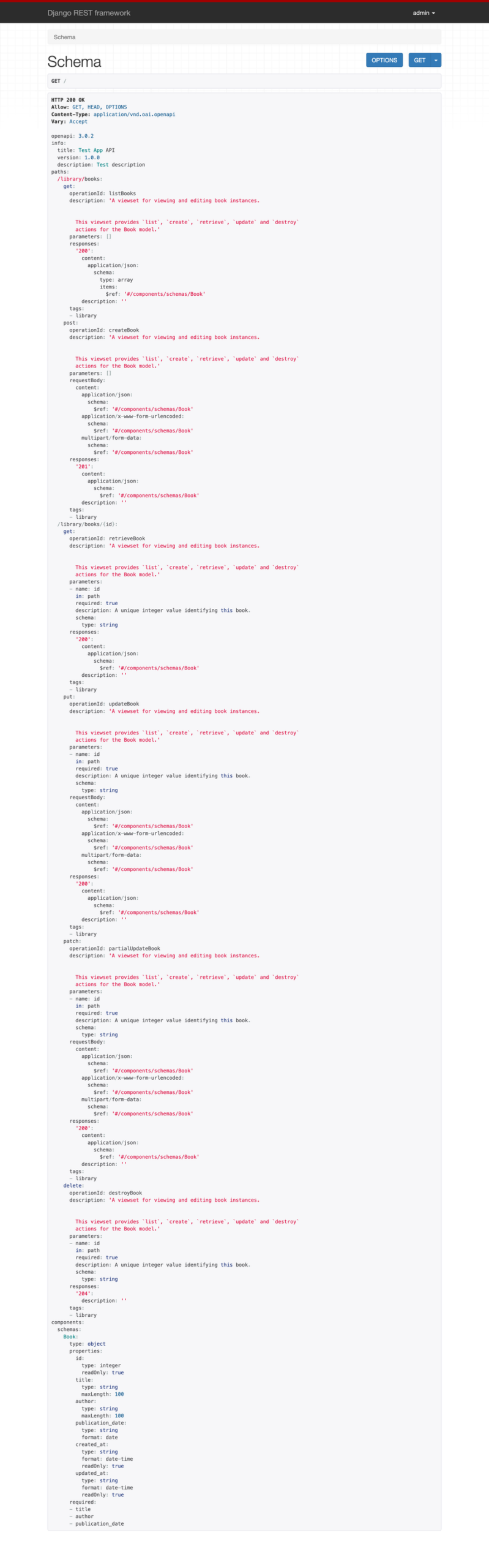
Now, let’s configure OpenAPI schema to integrate apps.
First, install the necessary packages:
# pip install drf-spectacular

Collecting drf-spectacular
  Using cached drf_spectacular-0.28.0-py3-none-any.whl.metadata (14 kB)
Requirement already satisfied: Django>=2.2 in ./venv/lib/python3.12/site-packages (from drf-spectacular) (5.1.7)
Requirement already satisfied: djangorestframework>=3.10.3 in ./venv/lib/python3.12/site-packages (from drf-spectacular) (3.15.2)
Collecting uritemplate>=2.0.0 (from drf-spectacular)
  Using cached uritemplate-4.1.1-py2.py3-none-any.whl.metadata (2.9 kB)
Collecting PyYAML>=5.1 (from drf-spectacular)
  Using cached PyYAML-6.0.2-cp312-cp312-macosx_11_0_arm64.whl.metadata (2.1 kB)
Collecting jsonschema>=2.6.0 (from drf-spectacular)
  Using cached jsonschema-4.23.0-py3-none-any.whl.metadata (7.9 kB)
Collecting inflection>=0.3.1 (from drf-spectacular)
  Using cached inflection-0.5.1-py2.py3-none-any.whl.metadata (1.7 kB)
Requirement already satisfied: asgiref<4,>=3.8.1 in ./venv/lib/python3.12/site-packages (from Django>=2.2->drf-spectacular) (3.8.1)
Requirement already satisfied: sqlparse>=0.3.1 in ./venv/lib/python3.12/site-packages (from Django>=2.2->drf-spectacular) (0.5.3)
Collecting attrs>=22.2.0 (from jsonschema>=2.6.0->drf-spectacular)
  Using cached attrs-25.3.0-py3-none-any.whl.metadata (10 kB)
Collecting jsonschema-specifications>=2023.03.6 (from jsonschema>=2.6.0->drf-spectacular)
  Using cached jsonschema_specifications-2024.10.1-py3-none-any.whl.metadata (3.0 kB)
Collecting referencing>=0.28.4 (from jsonschema>=2.6.0->drf-spectacular)
  Using cached referencing-0.36.2-py3-none-any.whl.metadata (2.8 kB)
Collecting rpds-py>=0.7.1 (from jsonschema>=2.6.0->drf-spectacular)
  Using cached rpds_py-0.23.1-cp312-cp312-macosx_11_0_arm64.whl.metadata (4.1 kB)
Collecting typing-extensions>=4.4.0 (from referencing>=0.28.4->jsonschema>=2.6.0->drf-spectacular)
  Using cached typing_extensions-4.12.2-py3-none-any.whl.metadata (3.0 kB)
Using cached drf_spectacular-0.28.0-py3-none-any.whl (103 kB)
Using cached inflection-0.5.1-py2.py3-none-any.whl (9.5 kB)
Using cached jsonschema-4.23.0-py3-none-any.whl (88 kB)
Using cached PyYAML-6.0.2-cp312-cp312-macosx_11_0_arm64.whl (173 kB)
Using cached uritemplate-4.1.1-py2.py3-none-any.whl (10 kB)
Using cached attrs-25.3.0-py3-none-any.whl (63 kB)
Using cached jsonschema_specifications-2024.10.1-py3-none-any.whl (18 kB)
Using cached referencing-0.36.2-py3-none-any.whl (26 kB)
Using cached rpds_py-0.23.1-cp312-cp312-macosx_11_0_arm64.whl (349 kB)
Using cached typing_extensions-4.12.2-py3-none-any.whl (37 kB)
Installing collected packages: uritemplate, typing-extensions, rpds-py, PyYAML, inflection, attrs, referencing, jsonschema-specifications, jsonschema, drf-spectacular
Successfully installed PyYAML-6.0.2 attrs-25.3.0 drf-spectacular-0.28.0 inflection-0.5.1 jsonschema-4.23.0 jsonschema-specifications-2024.10.1 referencing-0.36.2 rpds-py-0.23.1 typing-extensions-4.12.2 uritemplate-4.1.1
Then, update urls.py in the main app directory (library_rest):
from django.contrib import admin
from django.urls import include, path
from rest_framework import permissions
from rest_framework.schemas import get_schema_view

from .permissions import AccessListPermission
from drf_spectacular.views import SpectacularAPIView, SpectacularRedocView, SpectacularSwaggerView

schema_url_patterns = [
    path('library/', include('library.urls')),
]

urlpatterns = [
    path('admin/', admin.site.urls),
    path('api-auth/', include('rest_framework.urls')),
    path('openapi', SpectacularAPIView().as_view(), name='schema'),
    path('',
         SpectacularRedocView.as_view(url_name='schema'), name='redoc'),
] + schema_url_patterns
Append on bottom of settings.py file:
REST_FRAMEWORK = {
    # YOUR SETTINGS
    'DEFAULT_SCHEMA_CLASS': 'drf_spectacular.openapi.AutoSchema',
    'DEFAULT_RENDERER_CLASSES': [
        'rest_framework.renderers.BrowsableAPIRenderer',
        'rest_framework.renderers.JSONRenderer',
    ],
}

SPECTACULAR_SETTINGS = {
    'TITLE': 'Library App API',
    'DESCRIPTION': 'Library description',
    'VERSION': '1.0.0',
    'SERVE_INCLUDE_SCHEMA': False,
    'COMPONENT_SPLIT_PATCH': False,
    'SERVE_URLCONF': 'library_rest.urls',
    'PUBLIC': False,
    'OAS_VERSION': '3.1.1'
}
Add drf_spectacular on INSTALLED_APPS into settings.py:
INSTALLED_APPS = [
    'django.contrib.admin',
    'django.contrib.auth',
    'django.contrib.contenttypes',
    'django.contrib.sessions',
    'django.contrib.messages',
    'django.contrib.staticfiles',
    'rest_framework',
    'django_filters',
    'corsheaders',
    'library',
    'drf_spectacular',
]
Now, you can access the OpenAPI schema at the root of your API. This schema describes all available endpoints and data structures.
To export the schema in OpenAPI format, you can use the following command:
# curl http://localhost:8000/openapi > openapi.yamlThis command fetches the schema from the root URL (/) and saves it to a file named openapi.yaml. You can then use this file with tools like Swagger UI or Postman to explore and test your API.
You can also access the OpenAPI schema directly in your browser by navigating to the root URL of your API (e.g., http://localhost:8000/). The schema will be displayed in a human-readable format.

Securing the OpenAPI schema
To enhance security, you might want to restrict access to the OpenAPI schema to specific IP addresses or user groups. You can achieve this by creating a custom permission class.
First, create a file named permissions.py inside your main app directory (library_rest):
from rest_framework import permissions
from django.conf import settings


def get_client_ip(request):
    x_forwarded_for = request.META.get('HTTP_X_FORWARDED_FOR')
    if x_forwarded_for:
        ip = x_forwarded_for.split(',')[0]
    else:
        ip = request.META.get('REMOTE_ADDR')
    return ip


class AccessListPermission(permissions.BasePermission):
    """
    Allows access only to specific IP addresses.
    """

    def has_permission(self, request, view):
        allowed_ips = getattr(settings, 'ACCESS_LIST', [])
        ip_address = request.META.get('REMOTE_ADDR')
        return ip_address in allowed_ips
Then, update your settings.py file to include the ACCESS_LIST setting:
ACCESS_LIST = ['127.0.0.1', '::1'] # Add the IP addresses that are allowed to access the schemaFinally, update settings.py to use the new permission class:
SPECTACULAR_SETTINGS = {
    'TITLE': 'Library App API',
    'DESCRIPTION': 'Library description',
    'VERSION': '1.0.0',
    'SERVE_INCLUDE_SCHEMA': False,
    'COMPONENT_SPLIT_PATCH': False,
    'SERVE_URLCONF': 'library_rest.urls',
    'PUBLIC': False,
    'OAS_VERSION': '3.1.1',
    'SERVE_PERMISSIONS': ['library_rest.permissions.AccessListPermission'],
}
With these changes, only requests originating from the specified IP addresses will be able to access the OpenAPI schema.

Angular OpenAPI integrations
To integrate the OpenAPI schema into your Angular project, you can use tools like @openapitools/openapi-generator-cli to generate an Angular service from the schema.
First, install the @openapitools/openapi-generator-cli package:
# npm install @openapitools/openapi-generator-cli --save-dev

added 81 packages, and audited 1018 packages in 9s

162 packages are looking for funding
  run `npm fund` for details

found 0 vulnerabilities
This command adds @openapitools/openapi-generator-cli to your package.json file as a dev dependency.
  "devDependencies": {
    ...
    "@openapitools/openapi-generator-cli": "^2.17.0",
    ...
  },
Then, generate the Angular service update package.json with this script:
  "scripts": {
    ...
    "generate:api": "openapi-generator-cli generate  -p supportsES6=true,withInterfaces=true,useSingleRequestParameter=true -i http://127.0.0.1:8000/openapi -g typescript-angular -o src/app/modules/core/api/v1"
  },
These parameters configure the code generation with option -p:
supportsES6=true: This option ensures that the generated code uses ES6 syntax (e.g.,class,let,const, arrow functions). This is generally desirable for modern Angular projects.withInterfaces=true: This setting tells the generator to create TypeScript interfaces for the data models defined in your OpenAPI schema. Using interfaces improves type safety and makes your Angular code more maintainable.useSingleRequestParameter=true: This option bundles all the parameters for a given API endpoint into a single request parameter object. This can simplify the method signatures in your generated service and make it easier to add new parameters in the future without breaking existing code.
Here’s an explanation of the other parameters used in the openapi-generator-cli generate command:
-i http://127.0.0.1:8000/?format=openapi: This specifies the input OpenAPI schema. In this case, it’s fetching the schema from your Django backend athttp://127.0.0.1:8000/?format=openapi. The?format=openapipart ensures that the schema is returned in the OpenAPI format.-g typescript-angular: This specifies the generator to use.typescript-angulartells the generator to create an Angular client in TypeScript.-o src/app/modules/core/api/v1: This specifies the output directory where the generated Angular service will be placed. In this case, the generated code will be located insrc/app/modules/core/api/v1within your Angular project.
Generate Angular rest client
Finaly we generate api angular typescript models, interfaces and services by running the command npm run generate:api:
# npm run generate:api

> library-web@0.0.0 generate:api
> openapi-generator-cli generate  -p supportsES6=true,withInterfaces=true,useSingleRequestParameter=true -i http://127.0.0.1:8000/?format=openapi -g typescript-angular -o src/app/modules/core/api/v1

Download 7.12.0 ...
Downloaded 7.12.0
Did set selected version to 7.12.0
[main] INFO  o.o.codegen.DefaultGenerator - Generating with dryRun=false
[main] INFO  o.o.c.ignore.CodegenIgnoreProcessor - Output directory (/Users/rgiannetto/Developer/library/library_web/src/app/modules/core/api/v1) does not exist, or is inaccessible. No file (.openapi-generator-ignore) will be evaluated.
[main] INFO  o.o.codegen.DefaultGenerator - OpenAPI Generator: typescript-angular (client)
[main] INFO  o.o.codegen.DefaultGenerator - Generator 'typescript-angular' is considered stable.
[main] INFO  o.o.c.l.AbstractTypeScriptClientCodegen - Warning: Environment variable 'TS_POST_PROCESS_FILE' is set but file post-processing is not enabled. To enable file post-processing, 'enablePostProcessFile' must be set to `true` (--enable-post-process-file for CLI).
[main] INFO  o.o.c.l.TypeScriptAngularClientCodegen - generating code for Angular 19.0.0 ...
[main] INFO  o.o.c.l.TypeScriptAngularClientCodegen -   (you can select the angular version by setting the additionalProperties (--additional-properties in CLI) ngVersion)
[main] INFO  o.o.codegen.utils.URLPathUtils - 'host' (OAS 2.0) or 'servers' (OAS 3.0) not defined in the spec. Default to [http://localhost] for server URL [http://localhost/]
[main] INFO  o.o.codegen.utils.URLPathUtils - 'host' (OAS 2.0) or 'servers' (OAS 3.0) not defined in the spec. Default to [http://localhost] for server URL [http://localhost/]
[main] INFO  o.o.codegen.TemplateManager - writing file /Users/rgiannetto/Developer/library/library_web/src/app/modules/core/api/v1/model/./book.ts
[main] INFO  o.o.codegen.utils.URLPathUtils - 'host' (OAS 2.0) or 'servers' (OAS 3.0) not defined in the spec. Default to [http://localhost] for server URL [http://localhost/]
[main] INFO  o.o.codegen.TemplateManager - writing file /Users/rgiannetto/Developer/library/library_web/src/app/modules/core/api/v1/api/library.service.ts
[main] INFO  o.o.codegen.TemplateManager - writing file /Users/rgiannetto/Developer/library/library_web/src/app/modules/core/api/v1/api/library.serviceInterface.ts
[main] INFO  o.o.codegen.utils.URLPathUtils - 'host' (OAS 2.0) or 'servers' (OAS 3.0) not defined in the spec. Default to [http://localhost] for server URL [http://localhost/]
[main] INFO  o.o.codegen.TemplateManager - writing file /Users/rgiannetto/Developer/library/library_web/src/app/modules/core/api/v1/model/models.ts
[main] INFO  o.o.codegen.TemplateManager - writing file /Users/rgiannetto/Developer/library/library_web/src/app/modules/core/api/v1/api/api.ts
[main] INFO  o.o.codegen.TemplateManager - writing file /Users/rgiannetto/Developer/library/library_web/src/app/modules/core/api/v1/index.ts
[main] INFO  o.o.codegen.TemplateManager - writing file /Users/rgiannetto/Developer/library/library_web/src/app/modules/core/api/v1/api.module.ts
[main] INFO  o.o.codegen.TemplateManager - writing file /Users/rgiannetto/Developer/library/library_web/src/app/modules/core/api/v1/configuration.ts
[main] INFO  o.o.codegen.TemplateManager - writing file /Users/rgiannetto/Developer/library/library_web/src/app/modules/core/api/v1/api.base.service.ts
[main] INFO  o.o.codegen.TemplateManager - writing file /Users/rgiannetto/Developer/library/library_web/src/app/modules/core/api/v1/variables.ts
[main] INFO  o.o.codegen.TemplateManager - writing file /Users/rgiannetto/Developer/library/library_web/src/app/modules/core/api/v1/encoder.ts
[main] INFO  o.o.codegen.TemplateManager - writing file /Users/rgiannetto/Developer/library/library_web/src/app/modules/core/api/v1/param.ts
[main] INFO  o.o.codegen.TemplateManager - writing file /Users/rgiannetto/Developer/library/library_web/src/app/modules/core/api/v1/.gitignore
[main] INFO  o.o.codegen.TemplateManager - writing file /Users/rgiannetto/Developer/library/library_web/src/app/modules/core/api/v1/git_push.sh
[main] INFO  o.o.codegen.TemplateManager - writing file /Users/rgiannetto/Developer/library/library_web/src/app/modules/core/api/v1/README.md
[main] INFO  o.o.codegen.TemplateManager - writing file /Users/rgiannetto/Developer/library/library_web/src/app/modules/core/api/v1/.openapi-generator-ignore
[main] INFO  o.o.codegen.TemplateManager - writing file /Users/rgiannetto/Developer/library/library_web/src/app/modules/core/api/v1/.openapi-generator/VERSION
[main] INFO  o.o.codegen.TemplateManager - writing file /Users/rgiannetto/Developer/library/library_web/src/app/modules/core/api/v1/.openapi-generator/FILES
################################################################################
# Thanks for using OpenAPI Generator.                                          #
# Please consider donation to help us maintain this project 🙏                 #
# https://opencollective.com/openapi_generator/donate                          #
################################################################################
This command GET to django server url http://localhost:8000/?format=openapi:
[01/Mar/2025 22:04:58] "GET /?format=openapi HTTP/1.1" 200 5105This command created the Angular modules in the src/app/modules/core/api/v1 directory.

Now, whenever the Django REST services change, you can simply update the Angular services by running the command npm run generate:api.
Leave a Reply