
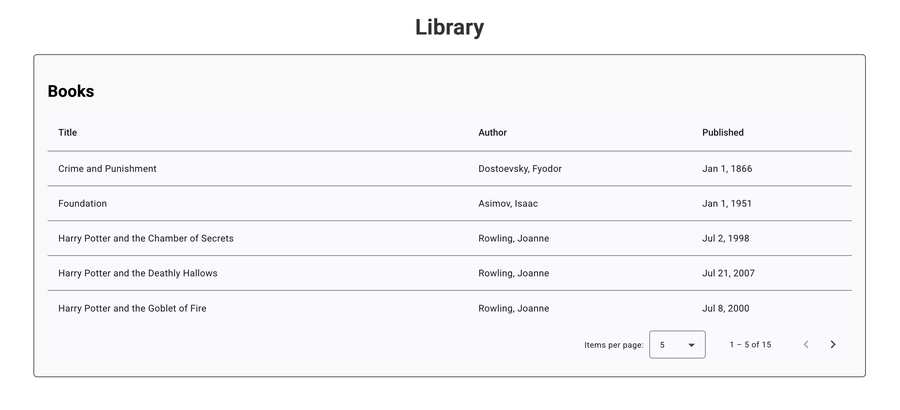
Mat-Table e Mat-Sort
Ora aggiorniamo il nostro template library.component.html come segue:
<h1>{{ title }}</h1>

<div class="library">
  <h2>Books</h2>

  <table *ngIf="books" mat-table [dataSource]="books" class="library-table" matSort matSortActive="ordering" matSortDirection="desc" (matSortChange)="handleSortEvent($event)">
    <!-- Title Column -->
    <ng-container matColumnDef="title">
      <th mat-header-cell *matHeaderCellDef mat-sort-header>Title</th>
      <td mat-cell *matCellDef="let row">{{ row.title }}</td>
    </ng-container>

    <!-- Author Column -->
    <ng-container matColumnDef="author_name">
      <th mat-header-cell *matHeaderCellDef mat-sort-header>Author</th>
      <td mat-cell *matCellDef="let row">{{ row.author_name }}</td>
    </ng-container>

    <!-- Published Column -->
    <ng-container matColumnDef="publication_date">
      <th mat-header-cell *matHeaderCellDef mat-sort-header>Published</th>
      <td mat-cell *matCellDef="let row">{{ row.publication_date | date }}</td>
    </ng-container>

    <tr mat-header-row *matHeaderRowDef="displayedColumns"></tr>
    <tr mat-row *matRowDef="let row; columns: displayedColumns"></tr>
  </table>
  <mat-paginator
    #paginator
    [pageSize]="pageSize"
    [pageSizeOptions]="pageSizeOptions"
    [length]="totalBooks"
    [pageIndex]="pageIndex"
    (page)="handlePageEvent($event)"
    aria-label="Select page"
  >
  </mat-paginator>
</div>
Ecco una spiegazione dei componenti mat-table e mat-sort usati nel codice:
mat-table
Il componente mat-table di Angular Material serve a mostrare i dati in formato tabellare. Offre funzionalità come ordinamento, paginazione e filtro.
[dataSource]="books": collega la sorgente dati della tabella all’arraybooksdel componente.mat-tablerenderizzerà una riga per ogni oggetto di questo array.class="library-table": applica alla tabella una classe CSS per lo stile.*ngIf="books": garantisce che la tabella venga renderizzata solo quando l’arraybookscontiene dati.
Definizione delle colonne
Ogni colonna della tabella è definita con <ng-container matColumnDef="column_name">.
matColumnDef: specifica il nome univoco della colonna. Questo nome serve a riferirsi alla colonna nelle definizioni di intestazione e di riga.<th mat-header-cell *matHeaderCellDef>: definisce la cella di intestazione della colonna.mat-header-cell: contrassegna l’elemento come cella di intestazione.*matHeaderCellDef: fornisce il contenuto della cella di intestazione.mat-sort-header: abilita l’ordinamento su questa colonna.<td mat-cell *matCellDef="let row">: definisce la cella dati della colonna.mat-cell: contrassegna l’elemento come cella dati.*matCellDef="let row": fornisce il contenuto della cella dati.rowrappresenta i dati della riga corrente.
Definizione delle righe
<tr mat-header-row *matHeaderRowDef="displayedColumns"></tr>: definisce la riga di intestazione della tabella.mat-header-row: contrassegna l’elemento come riga di intestazione.*matHeaderRowDef="displayedColumns": specifica quali colonne includere nella riga di intestazione.displayedColumnsè un array del componente che elenca i nomi delle colonne.<tr mat-row *matRowDef="let row; columns: displayedColumns"></tr>: definisce le righe dati della tabella.mat-row: contrassegna l’elemento come riga dati.*matRowDef="let row; columns: displayedColumns": specifica quali colonne includere nelle righe dati.rowrappresenta i dati della riga corrente ecolumnsè collegato all’arraydisplayedColumns.
mat-sort
La direttiva mat-sort serve ad aggiungere la funzionalità di ordinamento alla tabella.
matSort: abilita l’ordinamento sulla tabella.matSortActive="ordering": imposta la colonna da ordinare per impostazione predefinita.matSortDirection="desc": imposta la direzione iniziale dell’ordinamento (crescente o decrescente).(matSortChange)="handleSortEvent($event)": collega l’eventomatSortChangeal metodohandleSortEventdel componente. Questo evento viene emesso quando l’utente clicca sull’intestazione di una colonna ordinabile.
matSortHeader
mat-sort-header: questa direttiva viene aggiunta alle celle di intestazione (<th>) per renderle ordinabili. Quando l’utente clicca su una cella di intestazione con questa direttiva, viene emesso l’eventomatSortChange.
In sintesi, mat-table serve a mostrare i dati in formato tabellare e mat-sort serve ad aggiungere capacità di ordinamento alle colonne della tabella. L’array displayedColumns nel componente definisce l’ordine e la visibilità delle colonne.
Ora dobbiamo aggiornare library.component.ts:
import { Component, OnInit } from "@angular/core";
import { Book, LibraryService, PaginatedBookList, LibraryBooksListRequestParams } from "../../../core/api/v1";
import { DatePipe, NgIf } from "@angular/common";
import { PageEvent, MatPaginatorModule } from "@angular/material/paginator";
import { MatTableModule } from "@angular/material/table";
import { Sort, MatSortModule, SortDirection } from "@angular/material/sort";

@Component({
  selector: "app-library",
  imports: [NgIf, MatPaginatorModule, MatTableModule, MatSortModule, DatePipe],
  templateUrl: "./library.component.html",
  styleUrl: "./library.component.scss",
})
/**
 * The `LibraryComponent` is responsible for displaying a paginated and sortable list of books
 * in the library. It interacts with the `LibraryService` to fetch data and provides functionality
 * for handling user interactions such as pagination and sorting.
 *
 * @remarks
 * This component uses Angular Material's table and pagination components to display and manage
 * the list of books. It maintains the current state of pagination, sorting, and the list of books
 * retrieved from the API.
 *
 * @property {string} title - The title of the component, displayed in the UI.
 * @property {Book[]} books - The array of books currently displayed in the table.
 * @property {number} totalBooks - The total number of books available in the library.
 * @property {number} pageSize - The number of books displayed per page.
 * @property {number} pageIndex - The current page index (0-based).
 * @property {PageEvent | undefined} pageEvent - The latest pagination event triggered by the user.
 * @property {number[]} pageSizeOptions - The available options for the number of books per page.
 * @property {string} ordering - The current sorting order for the list of books.
 * @property {string[]} displayedColumns - The columns displayed in the table.
 *
 * @method ngOnInit - Lifecycle hook that initializes the component and fetches the initial list of books.
 * @method handlePageEvent - Handles pagination events and updates the list of books accordingly.
 * @method handleSortEvent - Handles sorting events and updates the list of books based on the selected criteria.
 * @method getBooks - Fetches a paginated and sorted list of books from the library service.
 *
 */
export class LibraryComponent implements OnInit {
  title = "Library";
  books: Book[] = [];
  totalBooks = 0;
  pageSize = 5;
  pageIndex = 0;
  pageEvent: PageEvent | undefined;
  pageSizeOptions = [5, 10, 25];
  ordering = "title";
  displayedColumns: string[] = ["title", "author_name", "publication_date"];

  constructor(private readonly libraryService: LibraryService) {}

  ngOnInit(): void {
    this.getBooks();
  }

  /**
   * Handles pagination events triggered by the user.
   * Updates the current page size and index based on the event,
   * and fetches the updated list of books accordingly.
   *
   * @param e - The pagination event containing the new page size and index.
   */
  handlePageEvent(e: PageEvent) {
    this.pageEvent = e;
    this.pageSize = e.pageSize;
    this.pageIndex = e.pageIndex;

    this.getBooks();
  }

  /**
   * Handles the sorting event triggered by the user.
   * Updates the sorting order and resets the page index before fetching the updated list of books.
   *
   * @param e - The sorting event containing the active sorting field and direction.
   * @param e.active - The field by which the data should be sorted (e.g., 'publication_date', 'author_name', 'title').
   * @param e.direction - The direction of sorting ('asc' for ascending, 'desc' for descending).
   */
  handleSortEvent(e: Sort) {
    const sortDirection: SortDirection = e.direction;
    let sortActive = e.active;

    if (sortActive === "publication_date") {
      sortActive = "publication_date";
    } else if (sortActive === "author_name") {
      sortActive = "author";
    } else if (sortActive === "title") {
      sortActive = "title";
    }

    if (sortDirection === "desc") {
      this.ordering = `${sortActive}`;
    } else {
      this.ordering = `-${sortActive}`;
    }

    this.pageIndex = 0;
    this.getBooks();
  }

  /**
   * Fetches a paginated list of books from the library service based on the current
   * page index, page size, and ordering criteria. Updates the component's `books`
   * and `totalBooks` properties with the retrieved data.
   *
   * @remarks
   * This method constructs the request parameters and calls the `libraryBooksList`
   * method of the `libraryService`. It handles the response by populating the
   * `books` array with the results and updating the `totalBooks` count. Errors
   * during the API call are logged to the console.
   *
   * @returns void
   */
  getBooks() {
    /**
     * Parameters for requesting a list of library books.
     *
     * @property page - The current page index incremented by 1 to match the API's 1-based pagination.
     * @property pageSize - The number of items to display per page.
     * @property ordering - The ordering criteria for the list of books.
     */
    const params: LibraryBooksListRequestParams = {
      page: this.pageIndex + 1,
      pageSize: this.pageSize,
      ordering: this.ordering,
    };

    this.libraryService.libraryBooksList(params).subscribe({
      next: (data: PaginatedBookList) => {
        console.log(data);
        this.books = data.results || [];
        this.totalBooks = data.total_records || 0;
      },
      error: (err) => {
        console.error(err);
      },
    });
  }
}
Il codice selezionato rappresenta il LibraryComponent in un’applicazione Angular, responsabile di mostrare un elenco paginato e ordinabile di libri. Questo componente interagisce con LibraryService per recuperare i dati da un’API e usa i componenti Angular Material per la paginazione (mat-paginator) e l’ordinamento (mat-sort).
Caratteristiche principali del codice
- Gestione della paginazione:
- Il metodo
handlePageEventviene attivato quando l’utente interagisce con il paginator. Aggiorna le proprietàpageSizeepageIndexe recupera l’elenco aggiornato dei libri chiamando il metodogetBooks.
- Gestione dell’ordinamento:
- Il metodo
handleSortEventè stato aggiunto per gestire gli eventi di ordinamento attivati dall’utente. Aggiorna la proprietàorderingin base alla colonna selezionata e alla direzione di ordinamento. Il parametroorderingviene poi usato nella richiesta API per recuperare l’elenco ordinato dei libri.
- Parametri della richiesta API:
- Il metodo
getBookscostruisce i parametri della richiesta, inclusipage,pageSizee il parametroorderingappena aggiunto. Questi parametri vengono passati al metodolibraryBooksListdiLibraryServiceper recuperare i dati.
- Colonne della tabella dinamiche:
- L’array
displayedColumnsdefinisce le colonne mostrate nella tabella Angular Material (mat-table). Includonotitle,author_nameepublication_date.
- Metadati del componente:
- Il decoratore
@Componentspecifica il selettore, il template, gli stili e i moduli Angular Material importati (MatPaginatorModule,MatTableModule,MatSortModule) e utility comeDatePipe.
Funzionalità appena aggiunte
- Metodo
handleSortEvent:- Questo metodo elabora l’evento di ordinamento emesso dalla direttiva
mat-sort. Determina la colonna attiva e la direzione di ordinamento, aggiorna la proprietàorderinge azzerapageIndexa 0 prima di recuperare i dati aggiornati.
- Questo metodo elabora l’evento di ordinamento emesso dalla direttiva
handleSortEvent(e: Sort) {
  const sortDirection: SortDirection = e.direction;
  let sortActive = e.active;

  if (sortActive === 'publication_date') {
    sortActive = 'publication_date';
  } else if (sortActive === 'author_name') {
    sortActive = 'author';
  } else if (sortActive === 'title') {
    sortActive = 'title';
  }

  if (sortDirection === 'desc') {
    this.ordering = `${sortActive}`;
  } else {
    this.ordering = `-${sortActive}`;
  }

  this.pageIndex = 0;
  this.getBooks();
}- Parametro
ordering:- La proprietà
orderingè inclusa nella richiesta API per specificare i criteri di ordinamento. Cambia dinamicamente in base all’interazione dell’utente con le intestazioni della tabella.
- La proprietà
const params: LibraryBooksListRequestParams = {
  page: this.pageIndex + 1,
  pageSize: this.pageSize,
  ordering: this.ordering,
};
Riepilogo
Questo componente mostra come integrare le funzionalità di tabella, paginator e ordinamento di Angular Material per creare un’interfaccia dinamica e intuitiva per mostrare e gestire un elenco di libri. L’aggiunta del metodo handleSortEvent e del parametro ordering migliora la capacità del componente di gestire l’ordinamento, offrendo un’esperienza utente più interattiva ed efficiente.
Infine aggiorniamo style.scss per ottimizzare il rendering della library:
html,
body {
  height: 100%;
}
body {
  margin: 0;
  font-family: Roboto, "Helvetica Neue", sans-serif;
} /* You can add global styles to this file, and also import other style files */

h1 {
  color: #333;
  text-align: center;
}

a {
  color: red;
  text-decoration: none;
}

a:hover {
  text-decoration: underline;
}

a:visited {
  color: red;
}

.book {
  background-color: #fff;
  border: 1px solid #ddd;
  border-radius: 5px;
  box-shadow: 0 2px 4px rgba(0, 0, 0, 0.1);
  margin: 10px;
  padding: 10px;
}

.not_found {
  color: #fff;
  background-color: rgba(255, 0, 0, 0.65);
  font-style: italic;
  text-align: center;
}

.library {
  display: block;
  justify-content: center;
  align-items: left;
  width: 1200px;
  margin: 0 auto;
  border: #333 solid 1px;
  border-radius: 5px;
  padding: 20px;
  background-color: #f9f9f9;
}
Ora stai usando la Mat-Table e puoi ordinare le colonne della tabella.
Aggiungere un filtro di ricerca
Per migliorare l’esperienza utente possiamo aggiungere un filtro di ricerca che permetta agli utenti di cercare i libri per titolo, autore o data di pubblicazione. Ecco come implementarlo:
Aggiornare library.component.html
Aggiungi il seguente campo di input di ricerca sopra la tabella:
<mat-form-field class="search-form-field">
  <mat-label>Search</mat-label>
  <input matInput type="text" placeholder="Search for books" [(ngModel)]="searchText" (ngModelChange)="onSearchInputChange($event)" />
  @if (searchText) {
  <button matSuffix mat-icon-button aria-label="Clear" (click)="clearFilter()">
    <mat-icon>close</mat-icon>
  </button>
  }
</mat-form-field>
Aggiornare library.component.ts
Aggiungi le seguenti proprietà e i seguenti metodi per gestire la funzionalità di ricerca:
  searchText = '';
  private searchSubject = new Subject<string>();

/**
 * Emits the new search text to the searchSubject.
 *
 * @param value - The new search text entered by the user.
 */
onSearchInputChange(value: string): void {
  this.searchSubject.next(value);
}

clearFilter(): void {
  this.searchText = '';
  this.pageIndex = 0;
  this.getBooks();
}
Aggiornare il metodo ngOnInit
ngOnInit(): void {
  this.getBooks();
  this.searchSubject.pipe(debounceTime(300)).subscribe((searchText) => {
    this.searchText = searchText;
    this.pageIndex = 0;
    this.getBooks();
  });
}
Il metodo ngOnInit è un hook del ciclo di vita di Angular che viene eseguito una volta all’inizializzazione del componente. In questo caso il metodo serve a:
- Caricare i dati iniziali:
- La chiamata a
this.getBooks()recupera l’elenco iniziale dei libri dalla sorgente dati (API) quando il componente viene caricato.
- Gestire la ricerca con il debounce:
- La proprietà
searchSubjectè unSubjectdi RxJS che emette i valori inseriti dall’utente nel campo di ricerca. - L’operatore
debounceTime(300)introduce un ritardo di 300 ms prima di emettere il valore. Questo evita di fare troppe chiamate API mentre l’utente digita velocemente. - La sottoscrizione a
searchSubjectaggiorna la proprietàsearchTextcon il valore corrente, azzera l’indice di pagina (pageIndex) a 0 e poi chiamathis.getBooks()per aggiornare i risultati della ricerca.
Flusso del codice
- L’utente digita nel campo di ricerca.
- Il valore viene emesso a
searchSubject. - Dopo 300 ms di inattività il valore viene elaborato.
- L’elenco dei libri viene aggiornato chiamando
this.getBooks()con il nuovo testo di ricerca.
Vantaggi
- Efficienza: riduce il numero di chiamate API grazie al debounce.
- Reattività: aggiorna dinamicamente i risultati della ricerca senza ricaricare l’intera pagina.
- Esperienza utente migliore: offre un’interfaccia fluida e reattiva per la ricerca.
Aggiornare il metodo getBooks
Modifica il metodo getBooks per includere il parametro searchText nella richiesta API:
let params: LibraryBooksListRequestParams = {
  page: this.pageIndex + 1,
  pageSize: this.pageSize,
  ordering: this.ordering,
};

if (this.searchText !== "") {
  params["search"] = this.searchText;
}
Aggiungiamo params["search"] = this.searchText.
Aggiornare gli stili
Aggiungi gli stili per il campo di input di ricerca in style.scss:
.library h2 {
  display: inline-block;
  text-align: left;
  color: #333;
  width: 200px;
}

.search-form-field {
  float: right;
  width: 250px;
}
Riepilogo
Con il filtro di ricerca in funzione, gli utenti possono ora cercare i libri in modo dinamico. Il metodo onSearchInputChange aggiorna la query di ricerca e recupera i risultati filtrati, mentre il metodo clearFilter azzera il campo di ricerca e mostra l’elenco completo dei libri.
Codice completo del componente
import { Component, OnInit } from "@angular/core";
import { Book, LibraryService, PaginatedBookList, LibraryBooksListRequestParams } from "../../../core/api/v1";
import { DatePipe, NgIf } from "@angular/common";
import { PageEvent, MatPaginatorModule } from "@angular/material/paginator";
import { MatTableModule } from "@angular/material/table";
import { Sort, MatSortModule, SortDirection } from "@angular/material/sort";
import { MatFormFieldModule } from "@angular/material/form-field";
import { MatInputModule } from "@angular/material/input";
import { FormsModule } from "@angular/forms";
import { MatIconModule } from "@angular/material/icon";
import { MatButtonModule } from "@angular/material/button";
import { debounceTime, Subject } from "rxjs";

@Component({
  selector: "app-library",
  imports: [NgIf, MatPaginatorModule, MatTableModule, MatSortModule, DatePipe, MatFormFieldModule, MatInputModule, FormsModule, MatButtonModule, MatIconModule],
  templateUrl: "./library.component.html",
  styleUrl: "./library.component.scss",
})
/**
 * The `LibraryComponent` is responsible for displaying a paginated and sortable list of books
 * in the library. It interacts with the `LibraryService` to fetch data and provides functionality
 * for handling user interactions such as pagination and sorting.
 *
 * @remarks
 * This component uses Angular Material's table and pagination components to display and manage
 * the list of books. It maintains the current state of pagination, sorting, and the list of books
 * retrieved from the API.
 *
 * @property {string} title - The title of the component, displayed in the UI.
 * @property {Book[]} books - The array of books currently displayed in the table.
 * @property {number} totalBooks - The total number of books available in the library.
 * @property {number} pageSize - The number of books displayed per page.
 * @property {number} pageIndex - The current page index (0-based).
 * @property {PageEvent | undefined} pageEvent - The latest pagination event triggered by the user.
 * @property {number[]} pageSizeOptions - The available options for the number of books per page.
 * @property {string} ordering - The current sorting order for the list of books.
 * @property {string[]} displayedColumns - The columns displayed in the table.
 *
 * @method ngOnInit - Lifecycle hook that initializes the component and fetches the initial list of books.
 * @method handlePageEvent - Handles pagination events and updates the list of books accordingly.
 * @method handleSortEvent - Handles sorting events and updates the list of books based on the selected criteria.
 * @method getBooks - Fetches a paginated and sorted list of books from the library service.
 * @method onSearchInputChange - Emits the new search text to the searchSubject.
 * @method performSearch - Executes the search logic based on the current search text.
 *
 * @example
 * Example usage in a template:
 * ```html
 * <app-library></app-library>
 * ```
 */
export class LibraryComponent implements OnInit {
  title = "Library";
  books: Book[] = [];
  totalBooks = 0;
  pageSize = 5;
  pageIndex = 0;
  pageEvent: PageEvent | undefined;
  pageSizeOptions = [5, 10, 25];
  ordering = "title";
  displayedColumns: string[] = ["title", "author_name", "publication_date"];
  searchText = "";
  private searchSubject = new Subject<string>();

  constructor(private readonly libraryService: LibraryService) {}

  /**
   * Lifecycle hook that is called after the component's view has been initialized.
   * Initializes the component by fetching the list of books and setting up a subscription
   * to handle search input with a debounce time of 300ms. When a search term is emitted,
   * it updates the search text, resets the page index, and fetches the filtered list of books.
   */
  ngOnInit(): void {
    this.getBooks();
    this.searchSubject.pipe(debounceTime(300)).subscribe((searchText) => {
      this.searchText = searchText;
      this.pageIndex = 0;
      this.getBooks();
    });
  }

  /**
   * Handles pagination events triggered by the user.
   * Updates the current page size and index based on the event,
   * and fetches the updated list of books accordingly.
   *
   * @param e - The pagination event containing the new page size and index.
   */
  handlePageEvent(e: PageEvent) {
    this.pageEvent = e;
    this.pageSize = e.pageSize;
    this.pageIndex = e.pageIndex;

    this.getBooks();
  }

  /**
   * Handles the sorting event triggered by the user.
   * Updates the sorting order and resets the page index before fetching the updated list of books.
   *
   * @param e - The sorting event containing the active sorting field and direction.
   * @param e.active - The field by which the data should be sorted (e.g., 'publication_date', 'author_name', 'title').
   * @param e.direction - The direction of sorting ('asc' for ascending, 'desc' for descending).
   */
  handleSortEvent(e: Sort) {
    const sortDirection: SortDirection = e.direction;
    let sortActive = e.active;

    if (sortActive === "publication_date") {
      sortActive = "publication_date";
    } else if (sortActive === "author_name") {
      sortActive = "author";
    } else if (sortActive === "title") {
      sortActive = "title";
    }

    if (sortDirection === "desc") {
      this.ordering = `${sortActive}`;
    } else {
      this.ordering = `-${sortActive}`;
    }

    this.pageIndex = 0;
    this.getBooks();
  }

  /**
   * Fetches a paginated list of books from the library service based on the current
   * page index, page size, and ordering criteria. Updates the component's `books`
   * and `totalBooks` properties with the retrieved data.
   *
   * @remarks
   * This method constructs the request parameters and calls the `libraryBooksList`
   * method of the `libraryService`. It handles the response by populating the
   * `books` array with the results and updating the `totalBooks` count. Errors
   * during the API call are logged to the console.
   *
   * @returns void
   */
  /**
   * Fetches a paginated list of library books based on the current search and pagination criteria.
   *
   * This method constructs the request parameters, including pagination, ordering, and optional search text,
   * and sends a request to the library service to retrieve the list of books. The results are then assigned
   * to the component's `books` property, and the total number of books is updated.
   *
   * @remarks
   * - The `page` parameter is adjusted to match the API's 1-based pagination.
   * - If a search text is provided, it is included in the request parameters.
   *
   * @throws Will log an error to the console if the API request fails.
   */
  getBooks() {
    /**
     * Parameters for requesting a list of library books.
     *
     * @property page - The current page index incremented by 1 to match the API's 1-based pagination.
     * @property pageSize - The number of items to display per page.
     * @property ordering - The ordering criteria for the list of books.
     * @property search - The search text to filter the list of books (optional).
     */
    let params: LibraryBooksListRequestParams = {
      page: this.pageIndex + 1,
      pageSize: this.pageSize,
      ordering: this.ordering,
    };

    if (this.searchText !== "") {
      params["search"] = this.searchText;
    }

    this.libraryService.libraryBooksList(params).subscribe({
      next: (data: PaginatedBookList) => {
        console.log(data);
        this.books = data.results || [];
        this.totalBooks = data.total_records || 0;
      },
      error: (err) => {
        console.error(err);
      },
    });
  }

  /**
   * Emits the new search text to the searchSubject.
   *
   * @param value - The new search text entered by the user.
   */
  onSearchInputChange(value: string): void {
    this.searchSubject.next(value);
  }

  /**
   * Clears the current search filter by resetting the search text and page index.
   * After clearing the filter, it fetches the updated list of books.
   */
  clearFilter(): void {
    this.searchText = "";
    this.pageIndex = 0;
    this.getBooks();
  }
}
<h1>{{ title }}</h1>
<div class="library">
<h2>Books</h2>
<mat-form-field class="search-form-field">
<mat-label>Search</mat-label>
<input matInput type="text" placeholder="Search for books" [(ngModel)]="searchText" (ngModelChange)="onSearchInputChange($event)" />
@if (searchText) {
<button matSuffix mat-icon-button aria-label="Clear" (click)="clearFilter()">
<mat-icon>close</mat-icon>
</button>
}
</mat-form-field>
<table *ngIf="books" mat-table [dataSource]="books" class="library-table" matSort matSortActive="ordering" matSortDirection="desc" (matSortChange)="handleSortEvent($event)">
<!-- Title Column -->
<ng-container matColumnDef="title">
<th mat-header-cell *matHeaderCellDef mat-sort-header>Title</th>
<td mat-cell *matCellDef="let row">{{ row.title }}</td>
</ng-container>
<!-- State Column -->
<ng-container matColumnDef="author_name">
<th mat-header-cell *matHeaderCellDef mat-sort-header>Author</th>
<td mat-cell *matCellDef="let row">{{ row.author_name }}</td>
</ng-container>
<!-- Created Column -->
<ng-container matColumnDef="publication_date">
<th mat-header-cell *matHeaderCellDef mat-sort-header>Published</th>
<td mat-cell *matCellDef="let row">{{ row.publication_date | date }}</td>
</ng-container>
<tr mat-header-row *matHeaderRowDef="displayedColumns"></tr>
<tr mat-row *matRowDef="let row; columns: displayedColumns"></tr>
</table>
<mat-paginator
#paginator
[pageSize]="pageSize"
[pageSizeOptions]="pageSizeOptions"
[length]="totalBooks"
[pageIndex]="pageIndex"
(page)="handlePageEvent($event)"
aria-label="Select page"
>
</mat-paginator>
</div>
Lascia un commento