
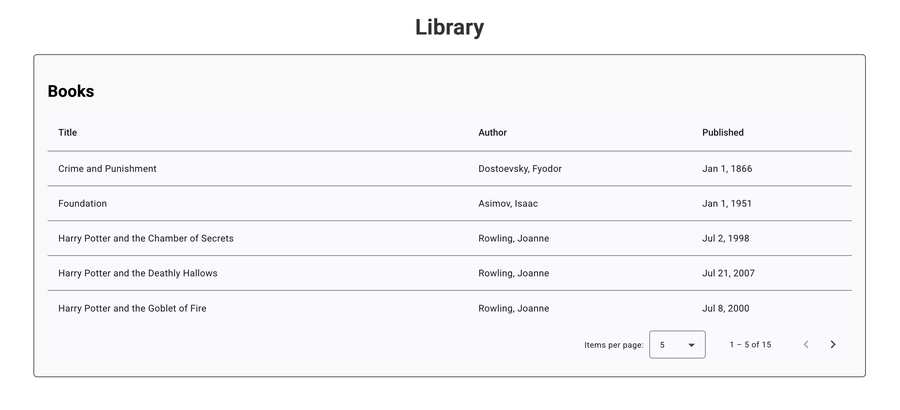
Mat-Table and Mat-Sort
Now, we update our library.component.html template as follow:
<h1>{{ title }}</h1>

<div class="library">
  <h2>Books</h2>

  <table *ngIf="books" mat-table [dataSource]="books" class="library-table" matSort matSortActive="ordering" matSortDirection="desc" (matSortChange)="handleSortEvent($event)">
    <!-- Title Column -->
    <ng-container matColumnDef="title">
      <th mat-header-cell *matHeaderCellDef mat-sort-header>Title</th>
      <td mat-cell *matCellDef="let row">{{ row.title }}</td>
    </ng-container>

    <!-- Author Column -->
    <ng-container matColumnDef="author_name">
      <th mat-header-cell *matHeaderCellDef mat-sort-header>Author</th>
      <td mat-cell *matCellDef="let row">{{ row.author_name }}</td>
    </ng-container>

    <!-- Published Column -->
    <ng-container matColumnDef="publication_date">
      <th mat-header-cell *matHeaderCellDef mat-sort-header>Published</th>
      <td mat-cell *matCellDef="let row">{{ row.publication_date | date }}</td>
    </ng-container>

    <tr mat-header-row *matHeaderRowDef="displayedColumns"></tr>
    <tr mat-row *matRowDef="let row; columns: displayedColumns"></tr>
  </table>
  <mat-paginator
    #paginator
    [pageSize]="pageSize"
    [pageSizeOptions]="pageSizeOptions"
    [length]="totalBooks"
    [pageIndex]="pageIndex"
    (page)="handlePageEvent($event)"
    aria-label="Select page"
  >
  </mat-paginator>
</div>
Here’s an explanation of the mat-table and mat-sort components used in the code:
mat-table
The mat-table component from Angular Material is used to display data in a tabular format. It provides features like sorting, pagination, and filtering.
[dataSource]="books": This binds the table’s data source to thebooksarray in the component. Themat-tablewill render a row for each object in this array.class="library-table": This applies a CSS class to the table for styling purposes.*ngIf="books": This ensures that the table is rendered only when thebooksarray has data.
Columns Definition
Each column in the table is defined using <ng-container matColumnDef="column_name">.
matColumnDef: Specifies the unique name for the column. This name is used to reference the column in the header and row definitions.<th mat-header-cell *matHeaderCellDef>: Defines the header cell for the column.mat-header-cell: Marks the element as a header cell.*matHeaderCellDef: Provides the content for the header cell.mat-sort-header: Enables sorting on this column.<td mat-cell *matCellDef="let row">: Defines the data cell for the column.mat-cell: Marks the element as a data cell.*matCellDef="let row": Provides the content for the data cell.rowrepresents the data for the current row.
Rows Definition
<tr mat-header-row *matHeaderRowDef="displayedColumns"></tr>: Defines the header row for the table.mat-header-row: Marks the element as a header row.*matHeaderRowDef="displayedColumns": Specifies which columns to include in the header row.displayedColumnsis an array in the component that lists the column names.<tr mat-row *matRowDef="let row; columns: displayedColumns"></tr>: Defines the data rows for the table.mat-row: Marks the element as a data row.*matRowDef="let row; columns: displayedColumns": Specifies which columns to include in the data rows.rowrepresents the data for the current row, andcolumnsis bound to thedisplayedColumnsarray.
mat-sort
The mat-sort directive is used to add sorting functionality to the table.
matSort: Enables sorting on the table.matSortActive="ordering": Sets the column that should be sorted by default.matSortDirection="desc": Sets the initial sorting direction (ascending or descending).(matSortChange)="handleSortEvent($event)": Binds thematSortChangeevent to thehandleSortEventmethod in the component. This event is emitted when the user clicks on a sortable column header.
matSortHeader
mat-sort-header: This directive is added to the header cells (<th>) to make them sortable. When the user clicks on a header cell with this directive, thematSortChangeevent is emitted.
In summary, mat-table is used to display data in a tabular format, and mat-sort is used to add sorting capabilities to the table columns. The displayedColumns array in the component defines the order and visibility of the columns.
Now, we need to update library.component.ts:
import { Component, OnInit } from "@angular/core";
import { Book, LibraryService, PaginatedBookList, LibraryBooksListRequestParams } from "../../../core/api/v1";
import { DatePipe, NgIf } from "@angular/common";
import { PageEvent, MatPaginatorModule } from "@angular/material/paginator";
import { MatTableModule } from "@angular/material/table";
import { Sort, MatSortModule, SortDirection } from "@angular/material/sort";

@Component({
  selector: "app-library",
  imports: [NgIf, MatPaginatorModule, MatTableModule, MatSortModule, DatePipe],
  templateUrl: "./library.component.html",
  styleUrl: "./library.component.scss",
})
/**
 * The `LibraryComponent` is responsible for displaying a paginated and sortable list of books
 * in the library. It interacts with the `LibraryService` to fetch data and provides functionality
 * for handling user interactions such as pagination and sorting.
 *
 * @remarks
 * This component uses Angular Material's table and pagination components to display and manage
 * the list of books. It maintains the current state of pagination, sorting, and the list of books
 * retrieved from the API.
 *
 * @property {string} title - The title of the component, displayed in the UI.
 * @property {Book[]} books - The array of books currently displayed in the table.
 * @property {number} totalBooks - The total number of books available in the library.
 * @property {number} pageSize - The number of books displayed per page.
 * @property {number} pageIndex - The current page index (0-based).
 * @property {PageEvent | undefined} pageEvent - The latest pagination event triggered by the user.
 * @property {number[]} pageSizeOptions - The available options for the number of books per page.
 * @property {string} ordering - The current sorting order for the list of books.
 * @property {string[]} displayedColumns - The columns displayed in the table.
 *
 * @method ngOnInit - Lifecycle hook that initializes the component and fetches the initial list of books.
 * @method handlePageEvent - Handles pagination events and updates the list of books accordingly.
 * @method handleSortEvent - Handles sorting events and updates the list of books based on the selected criteria.
 * @method getBooks - Fetches a paginated and sorted list of books from the library service.
 *
 */
export class LibraryComponent implements OnInit {
  title = "Library";
  books: Book[] = [];
  totalBooks = 0;
  pageSize = 5;
  pageIndex = 0;
  pageEvent: PageEvent | undefined;
  pageSizeOptions = [5, 10, 25];
  ordering = "title";
  displayedColumns: string[] = ["title", "author_name", "publication_date"];

  constructor(private readonly libraryService: LibraryService) {}

  ngOnInit(): void {
    this.getBooks();
  }

  /**
   * Handles pagination events triggered by the user.
   * Updates the current page size and index based on the event,
   * and fetches the updated list of books accordingly.
   *
   * @param e - The pagination event containing the new page size and index.
   */
  handlePageEvent(e: PageEvent) {
    this.pageEvent = e;
    this.pageSize = e.pageSize;
    this.pageIndex = e.pageIndex;

    this.getBooks();
  }

  /**
   * Handles the sorting event triggered by the user.
   * Updates the sorting order and resets the page index before fetching the updated list of books.
   *
   * @param e - The sorting event containing the active sorting field and direction.
   * @param e.active - The field by which the data should be sorted (e.g., 'publication_date', 'author_name', 'title').
   * @param e.direction - The direction of sorting ('asc' for ascending, 'desc' for descending).
   */
  handleSortEvent(e: Sort) {
    const sortDirection: SortDirection = e.direction;
    let sortActive = e.active;

    if (sortActive === "publication_date") {
      sortActive = "publication_date";
    } else if (sortActive === "author_name") {
      sortActive = "author";
    } else if (sortActive === "title") {
      sortActive = "title";
    }

    if (sortDirection === "desc") {
      this.ordering = `${sortActive}`;
    } else {
      this.ordering = `-${sortActive}`;
    }

    this.pageIndex = 0;
    this.getBooks();
  }

  /**
   * Fetches a paginated list of books from the library service based on the current
   * page index, page size, and ordering criteria. Updates the component's `books`
   * and `totalBooks` properties with the retrieved data.
   *
   * @remarks
   * This method constructs the request parameters and calls the `libraryBooksList`
   * method of the `libraryService`. It handles the response by populating the
   * `books` array with the results and updating the `totalBooks` count. Errors
   * during the API call are logged to the console.
   *
   * @returns void
   */
  getBooks() {
    /**
     * Parameters for requesting a list of library books.
     *
     * @property page - The current page index incremented by 1 to match the API's 1-based pagination.
     * @property pageSize - The number of items to display per page.
     * @property ordering - The ordering criteria for the list of books.
     */
    const params: LibraryBooksListRequestParams = {
      page: this.pageIndex + 1,
      pageSize: this.pageSize,
      ordering: this.ordering,
    };

    this.libraryService.libraryBooksList(params).subscribe({
      next: (data: PaginatedBookList) => {
        console.log(data);
        this.books = data.results || [];
        this.totalBooks = data.total_records || 0;
      },
      error: (err) => {
        console.error(err);
      },
    });
  }
}
The selected code represents the LibraryComponent in an Angular application, which is responsible for displaying a paginated and sortable list of books. This component interacts with the LibraryService to fetch data from an API and uses Angular Material components for pagination (mat-paginator) and sorting (mat-sort).
Key Features of the Code
- Pagination Handling:
- The
handlePageEventmethod is triggered when the user interacts with the paginator. It updates thepageSizeandpageIndexproperties and fetches the updated list of books by calling thegetBooksmethod.
- Sorting Handling:
- The
handleSortEventmethod has been added to handle sorting events triggered by the user. It updates theorderingproperty based on the selected column and sort direction. Theorderingparameter is then used in the API request to fetch the sorted list of books.
- API Request Parameters:
- The
getBooksmethod constructs the request parameters, includingpage,pageSize, and the newly addedorderingparameter. These parameters are passed to thelibraryBooksListmethod of theLibraryServiceto fetch the data.
- Dynamic Table Columns:
- The
displayedColumnsarray defines the columns displayed in the Angular Material table (mat-table). These includetitle,author_name, andpublication_date.
- Component Metadata:
- The
@Componentdecorator specifies the component’s selector, template, styles, and imported Angular Material modules (MatPaginatorModule,MatTableModule,MatSortModule) and utilities likeDatePipe.
Newly Added Features
handleSortEventMethod:- This method processes the sorting event emitted by the
mat-sortdirective. It determines the active column and sort direction, updates theorderingproperty, and resets thepageIndexto 0 before fetching the updated data.
- This method processes the sorting event emitted by the
handleSortEvent(e: Sort) {
  const sortDirection: SortDirection = e.direction;
  let sortActive = e.active;

  if (sortActive === 'publication_date') {
    sortActive = 'publication_date';
  } else if (sortActive === 'author_name') {
    sortActive = 'author';
  } else if (sortActive === 'title') {
    sortActive = 'title';
  }

  if (sortDirection === 'desc') {
    this.ordering = `${sortActive}`;
  } else {
    this.ordering = `-${sortActive}`;
  }

  this.pageIndex = 0;
  this.getBooks();
}orderingParameter:- The
orderingproperty is included in the API request to specify the sorting criteria. It dynamically changes based on the user’s interaction with the table headers.
- The
const params: LibraryBooksListRequestParams = {
  page: this.pageIndex + 1,
  pageSize: this.pageSize,
  ordering: this.ordering,
};
Summary
This component demonstrates how to integrate Angular Material’s table, paginator, and sort functionalities to create a dynamic and user-friendly interface for displaying and managing a list of books. The addition of the handleSortEvent method and the ordering parameter enhances the component’s ability to handle sorting, providing a more interactive and efficient user experience.
Finaly, we update style.scss to optimize library rendering:
html,
body {
  height: 100%;
}
body {
  margin: 0;
  font-family: Roboto, "Helvetica Neue", sans-serif;
} /* You can add global styles to this file, and also import other style files */

h1 {
  color: #333;
  text-align: center;
}

a {
  color: red;
  text-decoration: none;
}

a:hover {
  text-decoration: underline;
}

a:visited {
  color: red;
}

.book {
  background-color: #fff;
  border: 1px solid #ddd;
  border-radius: 5px;
  box-shadow: 0 2px 4px rgba(0, 0, 0, 0.1);
  margin: 10px;
  padding: 10px;
}

.not_found {
  color: #fff;
  background-color: rgba(255, 0, 0, 0.65);
  font-style: italic;
  text-align: center;
}

.library {
  display: block;
  justify-content: center;
  align-items: left;
  width: 1200px;
  margin: 0 auto;
  border: #333 solid 1px;
  border-radius: 5px;
  padding: 20px;
  background-color: #f9f9f9;
}
Now you are using the Mat-Table, and you can sort the table columns.
Adding a Search Filter
To enhance the user experience, we can add a search filter to allow users to search for books by title, author, or publication date. Here’s how to implement it:
Update library.component.html
Add the following search input field above the table:
<mat-form-field class="search-form-field">
  <mat-label>Search</mat-label>
  <input matInput type="text" placeholder="Search for books" [(ngModel)]="searchText" (ngModelChange)="onSearchInputChange($event)" />
  @if (searchText) {
  <button matSuffix mat-icon-button aria-label="Clear" (click)="clearFilter()">
    <mat-icon>close</mat-icon>
  </button>
  }
</mat-form-field>
Update library.component.ts
Add the following properties and methods to handle the search functionality:
  searchText = '';
  private searchSubject = new Subject<string>();

/**
 * Emits the new search text to the searchSubject.
 *
 * @param value - The new search text entered by the user.
 */
onSearchInputChange(value: string): void {
  this.searchSubject.next(value);
}

clearFilter(): void {
  this.searchText = '';
  this.pageIndex = 0;
  this.getBooks();
}
Update ngOnInit Method
ngOnInit(): void {
  this.getBooks();
  this.searchSubject.pipe(debounceTime(300)).subscribe((searchText) => {
    this.searchText = searchText;
    this.pageIndex = 0;
    this.getBooks();
  });
}
The ngOnInit method is an Angular lifecycle hook that is executed once when the component is initialized. In this case, the method is used for:
- Loading Initial Data:
- The call to
this.getBooks()retrieves the initial list of books from the data source (API) when the component is loaded.
- Handling Search with Debounce:
- The
searchSubjectproperty is an RxJSSubjectthat emits the values entered by the user in the search field. - The
debounceTime(300)operator introduces a 300ms delay before emitting the value. This prevents making too many API calls while the user is typing quickly. - The subscription to
searchSubjectupdates thesearchTextproperty with the current value, resets the page index (pageIndex) to 0, and then callsthis.getBooks()to refresh the search results.
Code Flow
- The user types in the search field.
- The value is emitted to the
searchSubject. - After 300ms of inactivity, the value is processed.
- The list of books is updated by calling
this.getBooks()with the new search text.
Benefits
- Efficiency: Reduces the number of API calls by using debounce.
- Responsiveness: Dynamically updates the search results without reloading the entire page.
- Improved User Experience: Provides a smooth and responsive interface for searching.
Update getBooks Method
Modify the getBooks method to include the searchText parameter in the API request:
let params: LibraryBooksListRequestParams = {
  page: this.pageIndex + 1,
  pageSize: this.pageSize,
  ordering: this.ordering,
};

if (this.searchText !== "") {
  params["search"] = this.searchText;
}
We add params["search"] = this.searchText.
Update Styles
Add styles for the search input field in style.scss:
.library h2 {
  display: inline-block;
  text-align: left;
  color: #333;
  width: 200px;
}

.search-form-field {
  float: right;
  width: 250px;
}
Summary
With the search filter in place, users can now search for books dynamically. The onSearchInputChange method updates the search query and fetches the filtered results, while the clearFilter method resets the search input and displays the full list of books.
Full component code
import { Component, OnInit } from "@angular/core";
import { Book, LibraryService, PaginatedBookList, LibraryBooksListRequestParams } from "../../../core/api/v1";
import { DatePipe, NgIf } from "@angular/common";
import { PageEvent, MatPaginatorModule } from "@angular/material/paginator";
import { MatTableModule } from "@angular/material/table";
import { Sort, MatSortModule, SortDirection } from "@angular/material/sort";
import { MatFormFieldModule } from "@angular/material/form-field";
import { MatInputModule } from "@angular/material/input";
import { FormsModule } from "@angular/forms";
import { MatIconModule } from "@angular/material/icon";
import { MatButtonModule } from "@angular/material/button";
import { debounceTime, Subject } from "rxjs";

@Component({
  selector: "app-library",
  imports: [NgIf, MatPaginatorModule, MatTableModule, MatSortModule, DatePipe, MatFormFieldModule, MatInputModule, FormsModule, MatButtonModule, MatIconModule],
  templateUrl: "./library.component.html",
  styleUrl: "./library.component.scss",
})
/**
 * The `LibraryComponent` is responsible for displaying a paginated and sortable list of books
 * in the library. It interacts with the `LibraryService` to fetch data and provides functionality
 * for handling user interactions such as pagination and sorting.
 *
 * @remarks
 * This component uses Angular Material's table and pagination components to display and manage
 * the list of books. It maintains the current state of pagination, sorting, and the list of books
 * retrieved from the API.
 *
 * @property {string} title - The title of the component, displayed in the UI.
 * @property {Book[]} books - The array of books currently displayed in the table.
 * @property {number} totalBooks - The total number of books available in the library.
 * @property {number} pageSize - The number of books displayed per page.
 * @property {number} pageIndex - The current page index (0-based).
 * @property {PageEvent | undefined} pageEvent - The latest pagination event triggered by the user.
 * @property {number[]} pageSizeOptions - The available options for the number of books per page.
 * @property {string} ordering - The current sorting order for the list of books.
 * @property {string[]} displayedColumns - The columns displayed in the table.
 *
 * @method ngOnInit - Lifecycle hook that initializes the component and fetches the initial list of books.
 * @method handlePageEvent - Handles pagination events and updates the list of books accordingly.
 * @method handleSortEvent - Handles sorting events and updates the list of books based on the selected criteria.
 * @method getBooks - Fetches a paginated and sorted list of books from the library service.
 * @method onSearchInputChange - Emits the new search text to the searchSubject.
 * @method performSearch - Executes the search logic based on the current search text.
 *
 * @example
 * Example usage in a template:
 * ```html
 * <app-library></app-library>
 * ```
 */
export class LibraryComponent implements OnInit {
  title = "Library";
  books: Book[] = [];
  totalBooks = 0;
  pageSize = 5;
  pageIndex = 0;
  pageEvent: PageEvent | undefined;
  pageSizeOptions = [5, 10, 25];
  ordering = "title";
  displayedColumns: string[] = ["title", "author_name", "publication_date"];
  searchText = "";
  private searchSubject = new Subject<string>();

  constructor(private readonly libraryService: LibraryService) {}

  /**
   * Lifecycle hook that is called after the component's view has been initialized.
   * Initializes the component by fetching the list of books and setting up a subscription
   * to handle search input with a debounce time of 300ms. When a search term is emitted,
   * it updates the search text, resets the page index, and fetches the filtered list of books.
   */
  ngOnInit(): void {
    this.getBooks();
    this.searchSubject.pipe(debounceTime(300)).subscribe((searchText) => {
      this.searchText = searchText;
      this.pageIndex = 0;
      this.getBooks();
    });
  }

  /**
   * Handles pagination events triggered by the user.
   * Updates the current page size and index based on the event,
   * and fetches the updated list of books accordingly.
   *
   * @param e - The pagination event containing the new page size and index.
   */
  handlePageEvent(e: PageEvent) {
    this.pageEvent = e;
    this.pageSize = e.pageSize;
    this.pageIndex = e.pageIndex;

    this.getBooks();
  }

  /**
   * Handles the sorting event triggered by the user.
   * Updates the sorting order and resets the page index before fetching the updated list of books.
   *
   * @param e - The sorting event containing the active sorting field and direction.
   * @param e.active - The field by which the data should be sorted (e.g., 'publication_date', 'author_name', 'title').
   * @param e.direction - The direction of sorting ('asc' for ascending, 'desc' for descending).
   */
  handleSortEvent(e: Sort) {
    const sortDirection: SortDirection = e.direction;
    let sortActive = e.active;

    if (sortActive === "publication_date") {
      sortActive = "publication_date";
    } else if (sortActive === "author_name") {
      sortActive = "author";
    } else if (sortActive === "title") {
      sortActive = "title";
    }

    if (sortDirection === "desc") {
      this.ordering = `${sortActive}`;
    } else {
      this.ordering = `-${sortActive}`;
    }

    this.pageIndex = 0;
    this.getBooks();
  }

  /**
   * Fetches a paginated list of books from the library service based on the current
   * page index, page size, and ordering criteria. Updates the component's `books`
   * and `totalBooks` properties with the retrieved data.
   *
   * @remarks
   * This method constructs the request parameters and calls the `libraryBooksList`
   * method of the `libraryService`. It handles the response by populating the
   * `books` array with the results and updating the `totalBooks` count. Errors
   * during the API call are logged to the console.
   *
   * @returns void
   */
  /**
   * Fetches a paginated list of library books based on the current search and pagination criteria.
   *
   * This method constructs the request parameters, including pagination, ordering, and optional search text,
   * and sends a request to the library service to retrieve the list of books. The results are then assigned
   * to the component's `books` property, and the total number of books is updated.
   *
   * @remarks
   * - The `page` parameter is adjusted to match the API's 1-based pagination.
   * - If a search text is provided, it is included in the request parameters.
   *
   * @throws Will log an error to the console if the API request fails.
   */
  getBooks() {
    /**
     * Parameters for requesting a list of library books.
     *
     * @property page - The current page index incremented by 1 to match the API's 1-based pagination.
     * @property pageSize - The number of items to display per page.
     * @property ordering - The ordering criteria for the list of books.
     * @property search - The search text to filter the list of books (optional).
     */
    let params: LibraryBooksListRequestParams = {
      page: this.pageIndex + 1,
      pageSize: this.pageSize,
      ordering: this.ordering,
    };

    if (this.searchText !== "") {
      params["search"] = this.searchText;
    }

    this.libraryService.libraryBooksList(params).subscribe({
      next: (data: PaginatedBookList) => {
        console.log(data);
        this.books = data.results || [];
        this.totalBooks = data.total_records || 0;
      },
      error: (err) => {
        console.error(err);
      },
    });
  }

  /**
   * Emits the new search text to the searchSubject.
   *
   * @param value - The new search text entered by the user.
   */
  onSearchInputChange(value: string): void {
    this.searchSubject.next(value);
  }

  /**
   * Clears the current search filter by resetting the search text and page index.
   * After clearing the filter, it fetches the updated list of books.
   */
  clearFilter(): void {
    this.searchText = "";
    this.pageIndex = 0;
    this.getBooks();
  }
}
<h1>{{ title }}</h1>
<div class="library">
<h2>Books</h2>
<mat-form-field class="search-form-field">
<mat-label>Search</mat-label>
<input matInput type="text" placeholder="Search for books" [(ngModel)]="searchText" (ngModelChange)="onSearchInputChange($event)" />
@if (searchText) {
<button matSuffix mat-icon-button aria-label="Clear" (click)="clearFilter()">
<mat-icon>close</mat-icon>
</button>
}
</mat-form-field>
<table *ngIf="books" mat-table [dataSource]="books" class="library-table" matSort matSortActive="ordering" matSortDirection="desc" (matSortChange)="handleSortEvent($event)">
<!-- Title Column -->
<ng-container matColumnDef="title">
<th mat-header-cell *matHeaderCellDef mat-sort-header>Title</th>
<td mat-cell *matCellDef="let row">{{ row.title }}</td>
</ng-container>
<!-- State Column -->
<ng-container matColumnDef="author_name">
<th mat-header-cell *matHeaderCellDef mat-sort-header>Author</th>
<td mat-cell *matCellDef="let row">{{ row.author_name }}</td>
</ng-container>
<!-- Created Column -->
<ng-container matColumnDef="publication_date">
<th mat-header-cell *matHeaderCellDef mat-sort-header>Published</th>
<td mat-cell *matCellDef="let row">{{ row.publication_date | date }}</td>
</ng-container>
<tr mat-header-row *matHeaderRowDef="displayedColumns"></tr>
<tr mat-row *matRowDef="let row; columns: displayedColumns"></tr>
</table>
<mat-paginator
#paginator
[pageSize]="pageSize"
[pageSizeOptions]="pageSizeOptions"
[length]="totalBooks"
[pageIndex]="pageIndex"
(page)="handlePageEvent($event)"
aria-label="Select page"
>
</mat-paginator>
</div>
Leave a Reply