
This document provides a comprehensive guide to using advanced filtering techniques in Django applications with the help of the django-filters library. It also explains how to integrate filtering, searching, and ordering functionalities into Django REST Framework views and viewsets.
Overview of django-filters
django-filters is a powerful library that simplifies the process of filtering querysets based on user input. It provides a declarative way to define filters for your models and integrates seamlessly with Django views and forms. This makes it an essential tool for building APIs with advanced filtering capabilities.
Key Features:
- Declarative Syntax: Define filters in a class-based manner, similar to Django forms.
- Integration with Django Views: Easily integrate with generic views like
ListVieworAPIView. - Support for Complex Lookups: Allows filtering using advanced lookups such as
icontains,gte,lte, etc. - Custom Filters: Create custom filter types for specific use cases.
- Extensibility: Combine with other Django REST Framework filters like
OrderingFilterandSearchFilterfor advanced functionality.
Example Usage of django-filters
Below is an example of how to use django-filters to filter a queryset of books based on their title and publication date.
from django_filters import rest_framework as filters
from myapp.models import Book

class BookFilter(filters.FilterSet):
    title = filters.CharFilter(lookup_expr='icontains')  # Case-insensitive title search
    published_date = filters.DateFilter(lookup_expr='gte')  # Filter books published after a specific date

    class Meta:
        model = Book
        fields = ['title', 'published_date']
This filter can then be applied in a view:
from django_filters.rest_framework import DjangoFilterBackend
from rest_framework.generics import ListAPIView
from myapp.models import Book
from myapp.filters import BookFilter

class BookListView(ListAPIView):
    queryset = Book.objects.all()
    filter_backends = [DjangoFilterBackend]
    filterset_class = BookFilter
This setup allows users to filter books by title (case-insensitive) and published date (greater than or equal to a specific date).
Using filterset_fields
For simpler use cases, you can use the filterset_fields property directly in your views or viewsets. This eliminates the need to define a custom FilterSet class.
Example:
from django_filters.rest_framework import DjangoFilterBackend
from rest_framework.viewsets import ModelViewSet
from myapp.models import Book
from myapp.serializers import BookSerializer

class BookViewSet(ModelViewSet):
    queryset = Book.objects.all()
    serializer_class = BookSerializer
    filter_backends = [DjangoFilterBackend]
filterset_fields = ['title', 'published_date'] # Fields to filter- How It Works:
- Automatically generates filters for the specified fields.
- Uses exact matches by default (e.g.,
?title=example).
- When to Use:
- Ideal for simple filtering needs.
- For advanced lookups (e.g.,
icontains,gte), define a customFilterSetclass.
OrderingFilter and SearchFilter
In addition to django-filters, Django REST Framework provides two powerful filters: OrderingFilter and SearchFilter. These filters allow you to add sorting and searching capabilities to your APIs.
OrderingFilter
OrderingFilter enables users to sort querysets based on specific fields.
Example:
from rest_framework.filters import OrderingFilter
from django_filters.rest_framework import DjangoFilterBackend
from rest_framework.viewsets import ModelViewSet
from myapp.models import Book
from myapp.serializers import BookSerializer

class BookViewSet(ModelViewSet):
    queryset = Book.objects.all()
    serializer_class = BookSerializer
    filter_backends = [DjangoFilterBackend, OrderingFilter]
    ordering_fields = ['title', 'published_date']  # Fields available for ordering
ordering = ['title'] # Default ordering- Usage:
- Users can sort books by title or published date using query parameters like:
?ordering=title(ascending order by title)?ordering=-published_date(descending order by published date)
- Users can sort books by title or published date using query parameters like:
- Default Ordering:
- The
orderingattribute specifies the default sorting if no query parameter is provided.
- The
SearchFilter
SearchFilter allows users to perform simple searches across specified fields.
Example:
from rest_framework.filters import SearchFilter
from django_filters.rest_framework import DjangoFilterBackend
from rest_framework.viewsets import ModelViewSet
from myapp.models import Book
from myapp.serializers import BookSerializer

class BookViewSet(ModelViewSet):
    queryset = Book.objects.all()
    serializer_class = BookSerializer
    filter_backends = [DjangoFilterBackend, SearchFilter]
search_fields = ['title', 'author__name'] # Fields to search- Usage:
- Users can search for books by title or author name using a query parameter like:
?search=python
- Users can search for books by title or author name using a query parameter like:
- Field Lookups:
- Supports lookups like
icontainsfor partial matches.
- Supports lookups like
Combining Filters, Ordering, and Search
You can combine DjangoFilterBackend, OrderingFilter, and SearchFilter to create a comprehensive API with advanced filtering, searching, and sorting capabilities.
Example Query:
?search=python&ordering=-published_date:- Filters books with “python” in the title or author name.
- Sorts results by publication date in descending order.
This document provides a detailed guide to implementing advanced filtering, searching, and ordering in Django applications. By leveraging django-filters and Django REST Framework’s built-in filters, you can create powerful and flexible APIs tailored to your application’s needs.
Example:
from rest_framework.filters import OrderingFilter, SearchFilter
from django_filters.rest_framework import DjangoFilterBackend
from rest_framework.viewsets import ModelViewSet
from myapp.models import Book
from myapp.serializers import BookSerializer

class BookViewSet(ModelViewSet):
    queryset = Book.objects.all()
    serializer_class = BookSerializer
    filter_backends = [DjangoFilterBackend, OrderingFilter, SearchFilter]
    filterset_fields = ['title', 'author', 'publication_date']
    search_fields = ['title', 'author__name']
    ordering_fields = ['title', 'author', 'publication_date']
ordering = ['title']- Comprehensive Functionality:
- Filtering by specific fields (
django-filters). - Sorting by multiple fields (
OrderingFilter). - Searching across related fields (
SearchFilter).
- Filtering by specific fields (
Example Query:
?search=python&ordering=-published_date:- Filters books with “python” in the title or author name.
- Sorts results by publication date in descending order.
Explanation of the BookViewSet Class
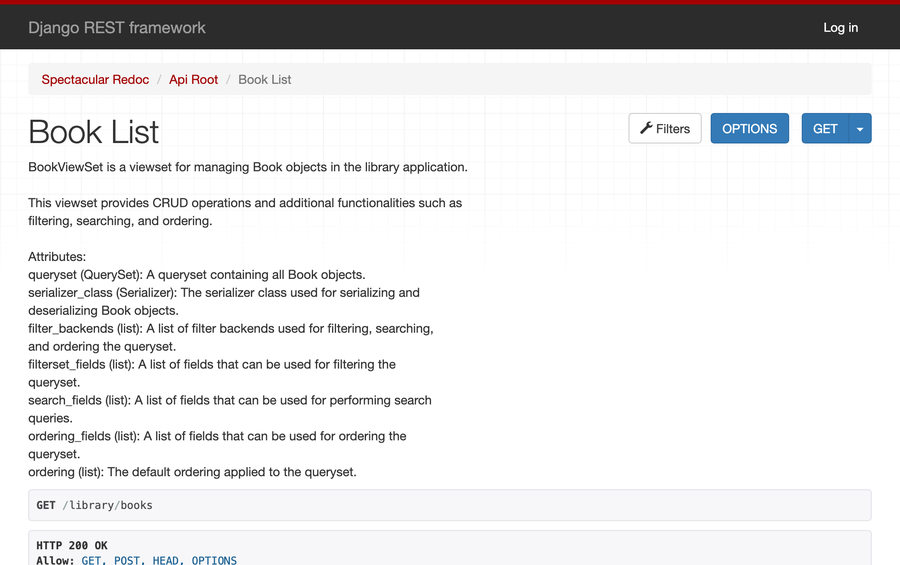
The BookViewSet class is a ModelViewSet that provides CRUD operations and additional functionalities such as filtering, searching, and ordering. Here’s a breakdown of its components:
queryset: Retrieves allBookobjects from the database.serializer_class: Specifies the serializer for convertingBookinstances to and from JSON.filter_backends: Includes backends for filtering (DjangoFilterBackend), searching (SearchFilter), and ordering (OrderingFilter).filterset_fields: Defines fields available for filtering.search_fields: Specifies fields for search queries.ordering_fields: Lists fields available for sorting.ordering: Sets the default ordering.

Full Code of BookViewSet:
from rest_framework import viewsets
from library.models.book import Book
from library.serializers.book_serializer import BookSerializer
from django_filters.rest_framework import DjangoFilterBackend
from rest_framework.filters import SearchFilter, OrderingFilter


class BookViewSet(viewsets.ModelViewSet):
    """
    BookViewSet is a viewset for managing Book objects in the library application.

    This viewset provides CRUD operations and additional functionalities such as
    filtering, searching, and ordering.

    Attributes:
      queryset (QuerySet): A queryset containing all Book objects.
      serializer_class (Serializer): The serializer class used for serializing and
        deserializing Book objects.
      filter_backends (list): A list of filter backends used for filtering, searching,
        and ordering the queryset.
      filterset_fields (list): A list of fields that can be used for filtering the
        queryset.
      search_fields (list): A list of fields that can be used for performing search
        queries.
      ordering_fields (list): A list of fields that can be used for ordering the
        queryset.
      ordering (list): The default ordering applied to the queryset.
    """

    queryset = Book.objects.all()
    serializer_class = BookSerializer
    filter_backends = [DjangoFilterBackend, OrderingFilter, SearchFilter]
    filterset_fields = ['title', 'author', 'publication_date']
    search_fields = ['title', 'author__last_name', 'author__first_name']
    ordering_fields = ['title', 'author', 'publication_date']
    ordering = ['title']
Limitations of the Current Interface
Now we recreate OpenAPI client using npm run generate:api.
The OpenAPI generator creates TypeScript interfaces for request parameters and response objects. Below is a part of a generated interface for listing books:
export interface LibraryBooksListRequestParams {
  author?: number;
  ordering?: string;
  publicationDate?: string;
  search?: string;
  title?: string;
}
The current implementation of the LibraryBooksListRequestParams interface and the corresponding API does not support pagination. This means that when querying the database, all records matching the filters are returned in a single response. While this may work for small datasets, it can lead to significant performance issues as the number of records in the database grows.
Performance Issues:
- Large Payloads: Returning all records in a single response can result in large payloads, increasing network latency and memory usage on both the server and client.
- Slow Queries: Fetching all records at once can slow down database queries, especially when combined with complex filters or joins.
- Poor User Experience: Loading a large number of records can cause delays in rendering the data on the frontend, leading to a poor user experience.
Solution: Implementing Pagination
To address these issues, it is necessary to implement pagination in the API. Pagination allows the server to return only a subset of the data (a “page”) at a time, reducing the load on the server and improving performance.
Steps to Implement Pagination:
- Enable Pagination in Django REST Framework: You can update the Django REST Framework settings to enable pagination. For example, you can use the
PageNumberPaginationclass.
REST_FRAMEWORK = {
    # ...existing settings...
    'DEFAULT_PAGINATION_CLASS': 'rest_framework.pagination.PageNumberPagination',
    'PAGE_SIZE': 10,  # Number of records per page
}
If the default pagination behavior does not meet your requirements, you can create a custom pagination class. For example, you might want to include additional metadata in the response or customize the page size dynamically.
from rest_framework.pagination import PageNumberPagination
from rest_framework.response import Response

class LibraryPagination(PageNumberPagination):
 page_size_query_param = 'page_size'
 max_page_size = 100
 page_size = 5

 def get_paginated_response(self, data):
     return Response({
         'total_records': self.page.paginator.count,
         'total_pages': self.page.paginator.num_pages,
         'current_page': self.page.number,
         'next': self.get_next_link(),
         'previous': self.get_previous_link(),
         'results': data
     })

 def get_paginated_response_schema(self, schema):
     return {
         'type': 'object',
         'properties': {
             'total_records': {
                 'type': 'integer',
                 'example': 123,
             },
             'total_pages': {
                 'type': 'integer',
                 'example': 123,
             },
             'current_page': {
                 'type': 'integer',
                 'example': 123,
             },
             'next': {
                 'type': 'string',
                 'nullable': True,
                 'format': 'uri',
                 'example': '...'
             },
             'previous': {
                 'type': 'string',
                 'nullable': True,
                 'format': 'uri',
                 'example': '...'
             },
             'results': schema,
         },
}- Use the Custom Pagination Class: Update the Django REST Framework settings to use the custom pagination class.
REST_FRAMEWORK = {
    # ...existing settings...
    'DEFAULT_PAGINATION_CLASS': 'library.pagination.LibraryPagination',
    'PAGE_SIZE': 6,
}
Instead of setting LibraryPagination globally in the Django REST Framework settings, you can assign it directly to a specific ViewSet. This approach provides more granular control over pagination behavior for individual endpoints.
Example:
# ... your code ...
from library.pagination import LibraryPagination
# ...

class BookViewSet(viewsets.ModelViewSet):
    # ... your code ...
    pagination_class = LibraryPagination  # Assign the custom pagination class
    # ...
Benefits of Assigning LibraryPagination to a ViewSet
- Granular Control: Allows you to customize pagination behavior for specific endpoints without affecting the entire application.
- Flexibility: Enables different pagination strategies for different resources.
- Ease of Testing: Simplifies testing by isolating pagination logic to individual views.
By assigning LibraryPagination directly to a ViewSet, you can tailor the pagination behavior to meet the specific needs of that endpoint while maintaining flexibility across your application.
- Modify the API Response: With the custom pagination class, the API response will include additional metadata, such as the total number of pages and the current page.
{
  "total_records": 100,
  "total_pages": 10,
  "current_page": 1,
  "next": "http://localhost:8000/api/books/?page=2",
  "previous": null,
  "results": [
    {
      "id": 1,
      "title": "Book Title",
      "author": "Author Name",
      "publication_date": "2023-01-01"
      // ...
    }
    // ...other records...
  ]
}
Benefits of a Custom Pagination Class
- Flexibility: Allows customization of the pagination behavior and response structure.
- Improved User Experience: Provides more detailed information to the client, such as the total number of pages and records.
- Scalability: Handles large datasets efficiently while allowing clients to control the page size.
By implementing a custom pagination class, you can tailor the pagination behavior to meet the specific needs of your application and provide a better experience for your users.

Upgrade Frontend
Now we build the Angular Rest Client. After the client generations, we can see creation of the new interface PaginateBookList.
// paginatedBookList.ts
import { Book } from "./book";

export interface PaginatedBookList {
  count: number;
  next?: string;
  previous?: string;
  results: Array<Book>;
}
Now, we start angular develop server (ng serve) and obatain the error:
ng serve

x [ERROR] TS2740: Type 'PaginatedBookList' is missing the following properties from type 'Book[]': length, pop, push, concat, and 29 more. [plugin angular-compiler]

    src/app/app.component.ts:21:8:
      21 │         this.books = books;
         ╵         ~~~~~~~~~~
So wee need to update our app.component.ts to manage the data pagination.
import { Component, OnInit } from "@angular/core";
import { RouterLink, RouterOutlet } from "@angular/router";
import { Book, LibraryService } from "./modules/core/api/v1";
import { NgFor } from "@angular/common";

@Component({
  selector: "app-root",
  imports: [RouterOutlet, NgFor, RouterLink],
  templateUrl: "./app.component.html",
  styleUrl: "./app.component.scss",
})
/**
 * The `AppComponent` serves as the root component of the Library application.
 * It initializes the application state and interacts with the `LibraryService`
 * to fetch and display a list of books.
 *
 * @implements {OnInit}
 */
export class AppComponent implements OnInit {
  title = "Library";
  books: Book[] = [];

  constructor(private readonly libraryService: LibraryService) {}

  ngOnInit(): void {
    this.libraryService.libraryBooksList().subscribe({
      next: (data) => {
        this.books = data.results;
      },
      error: (err) => {
        console.error(err);
      },
    });
  }
}
This is the final class; in the next chapter, we will manage filters and pagination in our frontend application.
Leave a Reply