lastUpdate

My Technology View

Subscribe

Deploy Kubernetes Cluster

Start VM Installation

Install Virtual Machines on KVM

# virt-install --name k8s-control --os-variant ubuntu23.10 --vcpus 2 --memory 2048 \
--location /var/lib/libvirt/images/ubuntu-23.10-live-server-amd64.iso,kernel=casper/vmlinuz,initrd=casper/initrd  \
--network bridge=br0,model=virtio --disk size=50 --graphics none \
--extra-args='console=ttyS0,115200n8 --- console=ttyS0,115200n8' --debug
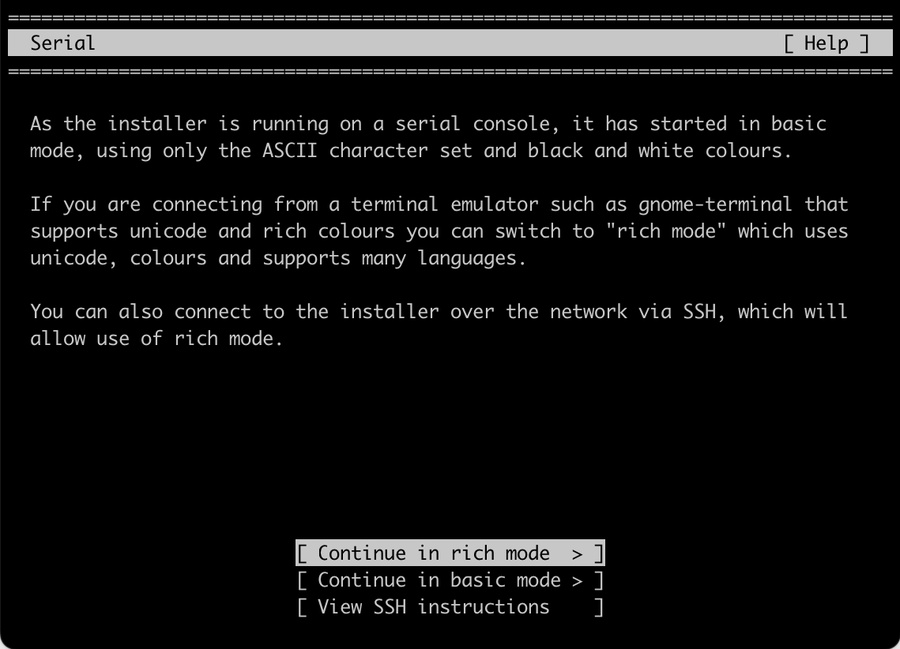
Start VM Installation
Select Language
Keyboard Configuration
Choose Type of install
Network Connections
Configure Proxy
Configure Ubuntu Archive Mirror
Guided storage Configuration
Storage Configuration
Confirm Storage Configuration
Profile Setup
SSH Setup
Featured Server Snaps
Install Complete
Reboot
Login
# ssh [user]@[ip]
Welcome to Ubuntu 23.10 (GNU/Linux 6.5.0-10-generic x86_64)

 * Documentation:  https://help.ubuntu.com
 * Management:     https://landscape.canonical.com
 * Support:        https://ubuntu.com/advantage

This system has been minimized by removing packages and content that are
not required on a system that users do not log into.

To restore this content, you can run the 'unminimize' command.
Last login: Tue Oct 31 17:19:02 2023

Install kubernetes control-plane

# sudo timedatectl set-timezone Europe/Rome
[sudo] password for axiom:
# sudo apt -y install docker.io containerd vim bash-completion \
command-not-found apt-transport-https ca-certificates curl net-tools iputils-ping
# sudo swapoff -a
# sudo sed -i '/swap/ s/^/#/' /etc/fstab
# cat <<EOF | sudo tee /etc/modules-load.d/k8s.conf
overlay
br_netfilter
EOF

# sudo modprobe overlay
# sudo modprobe br_netfilter

# sysctl params required by setup, params persist across reboots
# cat <<EOF | sudo tee /etc/sysctl.d/k8s.conf
net.bridge.bridge-nf-call-iptables  = 1
net.bridge.bridge-nf-call-ip6tables = 1
net.ipv4.ip_forward                 = 1
EOF

# Apply sysctl params without reboot
# sudo sysctl --system
# sudo systemctl stop apparmor.service
# sudo systemctl disable apparmor.service
# curl -fsSL https://pkgs.k8s.io/core:/stable:/v1.28/deb/Release.key | sudo gpg \
--dearmor -o /etc/apt/keyrings/kubernetes-apt-keyring.gpg
# echo 'deb [signed-by=/etc/apt/keyrings/kubernetes-apt-keyring.gpg] https://pkgs.k8s.io/core:/stable:/v1.28/deb/ /' | sudo tee /etc/apt/sources.list.d/kubernetes.list

# sudo apt-get update
# sudo apt-get install -y kubelet kubeadm kubectl
source <(kubectl completion bash)
alias k=kubectl
complete -o default -F __start_kubectl k
# sudo mkdir /etc/containerd
# sudo sh -c "containerd config default > /etc/containerd/config.toml"
# sudo sed -i 's/ SystemdCgroup = false/ SystemdCgroup = true/' /etc/containerd/config.toml
# sudo systemctl enable kubelet.service
# sudo systemctl daemon-reload
# sudo systemctl restart docker
# sudo systemctl restart containerd
# sudo systemctl restart kubelet
# sudo kubeadm config images pull
[config/images] Pulled registry.k8s.io/kube-apiserver:v1.28.3
[config/images] Pulled registry.k8s.io/kube-controller-manager:v1.28.3
[config/images] Pulled registry.k8s.io/kube-scheduler:v1.28.3
[config/images] Pulled registry.k8s.io/kube-proxy:v1.28.3
[config/images] Pulled registry.k8s.io/pause:3.9
[config/images] Pulled registry.k8s.io/etcd:3.5.9-0
[config/images] Pulled registry.k8s.io/coredns/coredns:v1.10.1
# sudo kubeadm init --apiserver-advertise-address=192.168.122.10 \
--pod-network-cidr=10.244.0.0/16
[init] Using Kubernetes version: v1.28.3
[preflight] Running pre-flight checks
[preflight] Pulling images required for setting up a Kubernetes cluster
[preflight] This might take a minute or two, depending on the speed of your internet connection
[preflight] You can also perform this action in beforehand using 'kubeadm config images pull'
W1031 18:42:54.901271    2995 checks.go:835] detected that the sandbox image "registry.k8s.io/pause:3.8" of the container runtime is inconsistent with that used by kubeadm. It is recommended that using "registry.k8s.io/pause:3.9" as the CRI sandbox image.
[certs] Using certificateDir folder "/etc/kubernetes/pki"
[certs] Generating "ca" certificate and key
[certs] Generating "apiserver" certificate and key
[certs] apiserver serving cert is signed for DNS names [k8s-control kubernetes kubernetes.default kubernetes.default.svc kubernetes.default.svc.cluster.local] and IPs [10.96.0.1 192.168.122.10]
[certs] Generating "apiserver-kubelet-client" certificate and key
[certs] Generating "front-proxy-ca" certificate and key
[certs] Generating "front-proxy-client" certificate and key
[certs] Generating "etcd/ca" certificate and key
[certs] Generating "etcd/server" certificate and key
[certs] etcd/server serving cert is signed for DNS names [k8s-control localhost] and IPs [192.168.122.10 127.0.0.1 ::1]
[certs] Generating "etcd/peer" certificate and key
[certs] etcd/peer serving cert is signed for DNS names [k8s-control localhost] and IPs [192.168.122.10 127.0.0.1 ::1]
[certs] Generating "etcd/healthcheck-client" certificate and key
[certs] Generating "apiserver-etcd-client" certificate and key
[certs] Generating "sa" key and public key
[kubeconfig] Using kubeconfig folder "/etc/kubernetes"
[kubeconfig] Writing "admin.conf" kubeconfig file
[kubeconfig] Writing "kubelet.conf" kubeconfig file
[kubeconfig] Writing "controller-manager.conf" kubeconfig file
[kubeconfig] Writing "scheduler.conf" kubeconfig file
[etcd] Creating static Pod manifest for local etcd in "/etc/kubernetes/manifests"
[control-plane] Using manifest folder "/etc/kubernetes/manifests"
[control-plane] Creating static Pod manifest for "kube-apiserver"
[control-plane] Creating static Pod manifest for "kube-controller-manager"
[control-plane] Creating static Pod manifest for "kube-scheduler"
[kubelet-start] Writing kubelet environment file with flags to file "/var/lib/kubelet/kubeadm-flags.env"
[kubelet-start] Writing kubelet configuration to file "/var/lib/kubelet/config.yaml"
[kubelet-start] Starting the kubelet
[wait-control-plane] Waiting for the kubelet to boot up the control plane as static Pods from directory "/etc/kubernetes/manifests". This can take up to 4m0s
[apiclient] All control plane components are healthy after 6.508166 seconds
[upload-config] Storing the configuration used in ConfigMap "kubeadm-config" in the "kube-system" Namespace
[kubelet] Creating a ConfigMap "kubelet-config" in namespace kube-system with the configuration for the kubelets in the cluster
[upload-certs] Skipping phase. Please see --upload-certs
[mark-control-plane] Marking the node k8s-control as control-plane by adding the labels: [node-role.kubernetes.io/control-plane node.kubernetes.io/exclude-from-external-load-balancers]
[mark-control-plane] Marking the node k8s-control as control-plane by adding the taints [node-role.kubernetes.io/control-plane:NoSchedule]
[bootstrap-token] Using token: ootk3y.17wh21twoay3e22o
[bootstrap-token] Configuring bootstrap tokens, cluster-info ConfigMap, RBAC Roles
[bootstrap-token] Configured RBAC rules to allow Node Bootstrap tokens to get nodes
[bootstrap-token] Configured RBAC rules to allow Node Bootstrap tokens to post CSRs in order for nodes to get long term certificate credentials
[bootstrap-token] Configured RBAC rules to allow the csrapprover controller automatically approve CSRs from a Node Bootstrap Token
[bootstrap-token] Configured RBAC rules to allow certificate rotation for all node client certificates in the cluster
[bootstrap-token] Creating the "cluster-info" ConfigMap in the "kube-public" namespace
[kubelet-finalize] Updating "/etc/kubernetes/kubelet.conf" to point to a rotatable kubelet client certificate and key
[addons] Applied essential addon: CoreDNS
[addons] Applied essential addon: kube-proxy

Your Kubernetes control-plane has initialized successfully!

To start using your cluster, you need to run the following as a regular user:

  mkdir -p $HOME/.kube
  sudo cp -i /etc/kubernetes/admin.conf $HOME/.kube/config
  sudo chown $(id -u):$(id -g) $HOME/.kube/config

Alternatively, if you are the root user, you can run:

  export KUBECONFIG=/etc/kubernetes/admin.conf

You should now deploy a pod network to the cluster.
Run "kubectl apply -f [podnetwork].yaml" with one of the options listed at:
  https://kubernetes.io/docs/concepts/cluster-administration/addons/

Then you can join any number of worker nodes by running the following on each as root:

kubeadm join 192.168.122.10:6443 --token ootk3y.17wh21twoay3e22o \
	--discovery-token-ca-cert-hash sha256:002ca6044627972a8a7d0dbb496d5ab17654e2a785b3115956a909a052321847
# mkdir -p $HOME/.kube
# sudo cp -i /etc/kubernetes/admin.conf $HOME/.kube/config
# sudo chown $(id -u):$(id -g) $HOME/.kube/config
# kubectl get nodes
NAME          STATUS     ROLES           AGE   VERSION
k8s-control   NotReady   control-plane   89s   v1.28.3

# kubectl get pods -A
NAMESPACE     NAME                                  READY   STATUS    RESTARTS   AGE
kube-system   coredns-5dd5756b68-6c2jd              0/1     Pending   0          86s
kube-system   coredns-5dd5756b68-rwtvp              0/1     Pending   0          86s
kube-system   etcd-k8s-control                      1/1     Running   0          102s
kube-system   kube-apiserver-k8s-control            1/1     Running   0          99s
kube-system   kube-controller-manager-k8s-control   1/1     Running   0          99s
kube-system   kube-proxy-9qxnc                      1/1     Running   0          86s
kube-system   kube-scheduler-k8s-control            1/1     Running   0          99s
CILIUM_CLI_VERSION=$(curl -s https://raw.githubusercontent.com/cilium/cilium-cli/main/stable.txt)
CLI_ARCH=amd64
if [ "$(uname -m)" = "aarch64" ]; then CLI_ARCH=arm64; fi
curl -L --fail --remote-name-all https://github.com/cilium/cilium-cli/releases/download/${CILIUM_CLI_VERSION}/cilium-linux-${CLI_ARCH}.tar.gz{,.sha256sum}
sha256sum --check cilium-linux-${CLI_ARCH}.tar.gz.sha256sum
sudo tar xzvfC cilium-linux-${CLI_ARCH}.tar.gz /usr/local/bin
rm cilium-linux-${CLI_ARCH}.tar.gz{,.sha256sum}
# cilium install --version 1.14.3
  Using Cilium version 1.14.3
 Auto-detected cluster name: kubernetes
 Auto-detected kube-proxy has been installed

# cilium status --wait
    /¯¯\
 /¯¯\__/¯¯\    Cilium:             OK
 \__/¯¯\__/    Operator:           OK
 /¯¯\__/¯¯\    Envoy DaemonSet:    disabled (using embedded mode)
 \__/¯¯\__/    Hubble Relay:       disabled
    \__/       ClusterMesh:        disabled

Deployment             cilium-operator    Desired: 1, Ready: 1/1, Available: 1/1
DaemonSet              cilium             Desired: 1, Ready: 1/1, Available: 1/1
Containers:            cilium             Running: 1
                       cilium-operator    Running: 1
Cluster Pods:          2/2 managed by Cilium
Helm chart version:    1.14.3
Image versions         cilium-operator    quay.io/cilium/operator-generic:v1.14.3@sha256:c9613277b72103ed36e9c0d16b9a17cafd507461d59340e432e3e9c23468b5e2: 1
                       cilium             quay.io/cilium/cilium:v1.14.3@sha256:e5ca22526e01469f8d10c14e2339a82a13ad70d9a359b879024715540eef4ace: 1
# kubectl get nodes
NAME          STATUS   ROLES           AGE   VERSION
k8s-control   Ready    control-plane   10m   v1.28.3

# kubectl get pods -A
NAMESPACE     NAME                                  READY   STATUS    RESTARTS   AGE
kube-system   cilium-b5jqw                          1/1     Running   0          66s
kube-system   cilium-operator-866755c479-hk5nr      1/1     Running   0          66s
kube-system   coredns-5dd5756b68-6c2jd              1/1     Running   0          10m
kube-system   coredns-5dd5756b68-rwtvp              1/1     Running   0          10m
kube-system   etcd-k8s-control                      1/1     Running   0          10m
kube-system   kube-apiserver-k8s-control            1/1     Running   0          10m
kube-system   kube-controller-manager-k8s-control   1/1     Running   0          10m
kube-system   kube-proxy-9qxnc                      1/1     Running   0          10m
kube-system   kube-scheduler-k8s-control            1/1     Running   0          10m

Install kubernetes worker-node

# virt-install --name k8s-worker1 --os-variant ubuntu23.10 --vcpus 2 --memory 2048 \
--location /var/lib/libvirt/images/ubuntu-23.10-live-server-amd64.iso,kernel=casper/vmlinuz,initrd=casper/initrd \
--network bridge=virbr0,model=virtio --disk size=50 --graphics none \
--extra-args='console=ttyS0,115200n8 --- console=ttyS0,115200n8' --debug
# sudo timedatectl set-timezone Europe/Rome
[sudo] password for axiom:
# sudo apt -y install docker.io containerd vim bash-completion \
command-not-found apt-transport-https ca-certificates curl net-tools iputils-ping
# sudo swapoff -a
# sudo sed -i '/swap/ s/^/#/' /etc/fstab
# cat <<EOF | sudo tee /etc/modules-load.d/k8s.conf
overlay
br_netfilter
EOF

# sudo modprobe overlay
# sudo modprobe br_netfilter

# sysctl params required by setup, params persist across reboots
# cat <<EOF | sudo tee /etc/sysctl.d/k8s.conf
net.bridge.bridge-nf-call-iptables  = 1
net.bridge.bridge-nf-call-ip6tables = 1
net.ipv4.ip_forward                 = 1
EOF

# Apply sysctl params without reboot
# sudo sysctl --system
# curl -fsSL https://pkgs.k8s.io/core:/stable:/v1.28/deb/Release.key | sudo gpg \
--dearmor -o /etc/apt/keyrings/kubernetes-apt-keyring.gpg
# echo 'deb [signed-by=/etc/apt/keyrings/kubernetes-apt-keyring.gpg] https://pkgs.k8s.io/core:/stable:/v1.28/deb/ /' | sudo tee /etc/apt/sources.list.d/kubernetes.list

# sudo apt-get update
# sudo apt-get install -y kubelet kubeadm kubectl
source <(kubectl completion bash)
alias k=kubectl
complete -o default -F __start_kubectl k
# sudo mkdir /etc/containerd
# sudo sh -c "containerd config default > /etc/containerd/config.toml"
# sudo sed -i 's/ SystemdCgroup = false/ SystemdCgroup = true/' /etc/containerd/config.toml
# sudo systemctl enable kubelet.service
# sudo systemctl daemon-reload
# sudo systemctl restart docker
# sudo systemctl restart containerd
# sudo systemctl restart kubelet
# sudo kubeadm join 192.168.122.10:6443 --token ootk3y.17wh21twoay3e22o      --discovery-token-ca-cert-hash sha256:002ca6044627972a8a7d0dbb496d5ab17654e2a785b3115956a909a052321847
[preflight] Running pre-flight checks
[preflight] Reading configuration from the cluster...
[preflight] FYI: You can look at this config file with 'kubectl -n kube-system get cm kubeadm-config -o yaml'
[kubelet-start] Writing kubelet configuration to file "/var/lib/kubelet/config.yaml"
[kubelet-start] Writing kubelet environment file with flags to file "/var/lib/kubelet/kubeadm-flags.env"
[kubelet-start] Starting the kubelet
[kubelet-start] Waiting for the kubelet to perform the TLS Bootstrap...

This node has joined the cluster:
* Certificate signing request was sent to apiserver and a response was received.
* The Kubelet was informed of the new secure connection details.

Run 'kubectl get nodes' on the control-plane to see this node join the cluster.
# kubectl get nodes
NAME          STATUS   ROLES           AGE   VERSION
k8s-control   Ready    control-plane   69m   v1.28.3
k8s-worker1   Ready    <none>          73s   v1.28.3

# kubectl get pods -A
NAMESPACE     NAME                                  READY   STATUS    RESTARTS        AGE
kube-system   cilium-b5jqw                          1/1     Running   1 (3m42s ago)   60m
kube-system   cilium-lz5ch                          1/1     Running   0               83s
kube-system   cilium-operator-866755c479-hk5nr      1/1     Running   1 (3m42s ago)   60m
kube-system   coredns-5dd5756b68-6c2jd              1/1     Running   1 (3m42s ago)   69m
kube-system   coredns-5dd5756b68-rwtvp              1/1     Running   1 (3m42s ago)   69m
kube-system   etcd-k8s-control                      1/1     Running   1 (3m42s ago)   69m
kube-system   kube-apiserver-k8s-control            1/1     Running   1 (3m42s ago)   69m
kube-system   kube-controller-manager-k8s-control   1/1     Running   1 (3m42s ago)   69m
kube-system   kube-proxy-9qxnc                      1/1     Running   1 (3m42s ago)   69m
kube-system   kube-proxy-hbtq5                      1/1     Running   0               83s
kube-system   kube-scheduler-k8s-control            1/1     Running   1 (3m42s ago)   69m

Install kubernetes dashboard

# kubectl apply -f https://raw.githubusercontent.com/kubernetes/dashboard/v2.7.0/aio/deploy/recommended.yaml
namespace/kubernetes-dashboard created
serviceaccount/kubernetes-dashboard created
service/kubernetes-dashboard created
secret/kubernetes-dashboard-certs created
secret/kubernetes-dashboard-csrf created
secret/kubernetes-dashboard-key-holder created
configmap/kubernetes-dashboard-settings created
role.rbac.authorization.k8s.io/kubernetes-dashboard created
clusterrole.rbac.authorization.k8s.io/kubernetes-dashboard created
rolebinding.rbac.authorization.k8s.io/kubernetes-dashboard created
clusterrolebinding.rbac.authorization.k8s.io/kubernetes-dashboard created
deployment.apps/kubernetes-dashboard created
service/dashboard-metrics-scraper created
deployment.apps/dashboard-metrics-scraper created
apiVersion: v1
kind: ServiceAccount
metadata:
  name: admin-user
  namespace: kubernetes-dashboard
# kubectl apply -f user.yaml
serviceaccount/admin-user created
apiVersion: rbac.authorization.k8s.io/v1
kind: ClusterRoleBinding
metadata:
  name: admin-user
roleRef:
  apiGroup: rbac.authorization.k8s.io
  kind: ClusterRole
  name: cluster-admin
subjects:
- kind: ServiceAccount
  name: admin-user
  namespace: kubernetes-dashboard
# kubectl apply -f role.yaml
clusterrolebinding.rbac.authorization.k8s.io/admin-user created
# ssh -L 8001:127.0.0.1:8001 axiom@k8s-control
# kubectl -n kubernetes-dashboard create token admin-user
eyJhbGciOiJSUzI1NiIsImtpZCI6I...DC3aIabINX6gP5-Tuuw2svnV6NYQ
# kubectl proxy
Starting to serve on 127.0.0.1:8001

Kubernetes Dashboard

Kubernetes Dashboard Login
Kubernetes Dashboard Interface
# kubectl get pods -A -o wide
NAMESPACE              NAME                                         READY   STATUS    RESTARTS     AGE   IP             NODE          NOMINATED NODE   READINESS GATES
kube-system            cilium-6jrhq                                 1/1     Running   0            8h    192.168.1.52   k8s-worker1   <none>           <none>
kube-system            cilium-gpw22                                 1/1     Running   0            8h    192.168.1.53   k8s-worker2   <none>           <none>
kube-system            cilium-kfzxn                                 1/1     Running   0            8h    192.168.1.51   k8s-control   <none>           <none>
kube-system            cilium-operator-866755c479-nmhmn             1/1     Running   0            8h    192.168.1.51   k8s-control   <none>           <none>
kube-system            coredns-5dd5756b68-2tkg8                     1/1     Running   0            8h    10.0.0.159     k8s-control   <none>           <none>
kube-system            coredns-5dd5756b68-q99x9                     1/1     Running   0            8h    10.0.0.14      k8s-control   <none>           <none>
kube-system            etcd-k8s-control                             1/1     Running   0            8h    192.168.1.51   k8s-control   <none>           <none>
kube-system            kube-apiserver-k8s-control                   1/1     Running   0            8h    192.168.1.51   k8s-control   <none>           <none>
kube-system            kube-controller-manager-k8s-control          1/1     Running   1 (8h ago)   8h    192.168.1.51   k8s-control   <none>           <none>
kube-system            kube-proxy-bk68g                             1/1     Running   0            8h    192.168.1.52   k8s-worker1   <none>           <none>
kube-system            kube-proxy-cczc8                             1/1     Running   0            8h    192.168.1.51   k8s-control   <none>           <none>
kube-system            kube-proxy-dhqtx                             1/1     Running   0            8h    192.168.1.53   k8s-worker2   <none>           <none>
kube-system            kube-scheduler-k8s-control                   1/1     Running   1 (8h ago)   8h    192.168.1.51   k8s-control   <none>           <none>
kubernetes-dashboard   dashboard-metrics-scraper-5657497c4c-cr27j   1/1     Running   0            8h    10.0.1.223     k8s-worker2   <none>           <none>
kubernetes-dashboard   kubernetes-dashboard-78f87ddfc-hwvb6         1/1     Running   0            8h    10.0.2.148     k8s-worker1   <none>           <none>

Install Helm

curl https://baltocdn.com/helm/signing.asc | gpg --dearmor | sudo tee /usr/share/keyrings/helm.gpg > /dev/null
sudo apt-get install apt-transport-https --yes
echo "deb [arch=$(dpkg --print-architecture) signed-by=/usr/share/keyrings/helm.gpg] https://baltocdn.com/helm/stable/debian/ all main" | sudo tee /etc/apt/sources.list.d/helm-stable-debian.list
sudo apt-get update
sudo apt-get install helm

helm repo add bitnami https://charts.bitnami.com/bitnami

Leave a Reply

Your email address will not be published. Required fields are marked *